


AntForms Custom Domain: Serve Forms on Your Own Branded Domain
Custom domain in AntForms is the ability to serve your forms from a subdomain you own, such as forms.yourcompany.com, instead of the default antforms.com URL. AntForms handles DNS verification and provisions a free Let’s Encrypt SSL certificate. The setup is self-service and takes under 10 minutes.
This guide is for founders, agencies, and teams who want their form URLs to match their brand. A form hosted on forms.yourcompany.com/contact builds more trust than one on antforms.com/f/abc123.
TL;DR AntForms custom domain lets you serve forms on your own subdomain. Add a CNAME and TXT record, wait for DNS verification, and AntForms provisions SSL in 1-5 minutes. Pro plan at $18.99/mo. One domain per workspace. Self-service setup with no support ticket required.
Why custom domains matter for forms
Forms served from your own domain build trust and remove third-party URL friction from your conversion funnel.
- Brand trust. A Stanford Web Credibility Project study found that URL appearance is one of the top factors users evaluate when deciding whether to trust a web page. A form at
forms.yourcompany.comsignals ownership. A form atantforms.com/f/abc123signals a third-party tool. - Phishing awareness. Users are trained to check URLs before entering personal data. A Google Safe Browsing report shows that phishing attempts increased 58% between 2022 and 2024. Your own domain removes the “is this legitimate?” hesitation.
- Email deliverability. When you share form links in emails, link scanners and spam filters treat known domains with higher trust. A Validity/Return Path deliverability study found that branded links improve click-through rates by 25-35% compared to generic shared domains.
- SEO value. Forms on your domain contribute to your site’s crawl graph. Google’s documentation on subdomains treats subdomains as part of the same web property for crawl budgets.
forms.yourcompany.compasses authority to your domain, whileantforms.comURLs do not. - Compliance requirements. Regulated industries (healthcare, finance) require data collection on organization-owned domains. A HIPAA Journal analysis lists domain ownership as a factor in compliance audits for web-based data collection.
We built custom domains because agency users told us their clients rejected form URLs that did not match the client’s brand. Over a 4-month period, “custom domain” was the second most requested feature after custom branding. Three agencies canceled trials because the default antforms.com URL was a dealbreaker for their enterprise clients. The two features together create a complete white-label form experience.
Before custom domains, all AntForms forms loaded at antforms.com/f/{slug}. After launching the feature, the first agency to connect a custom domain reported that their client’s legal team approved the form within 24 hours, compared to a 2-week review cycle for the previous third-party URL. The difference was the domain matching the client’s corporate web property.
How AntForms custom domain works
AntForms verifies your DNS records, provisions an SSL certificate, and routes form requests through your subdomain in three stages.
Architecture overview
The custom domain system has four layers:
- DNS verification. AntForms generates a CNAME record pointing your subdomain to
custom.antforms.comand a TXT record at_antforms-verify.yoursubdomaincontaining a unique verification token. A BullMQ worker checks DNS every 10 minutes until both records resolve. - SSL provisioning. After DNS verification, AntForms uses Caddy (an open-source web server with automatic HTTPS) to provision a Let’s Encrypt certificate. Caddy’s on-demand TLS issues the certificate on the first HTTPS request to your domain. Certificates renew every 90 days with zero manual intervention.
- Domain resolution. A middleware layer intercepts incoming requests, resolves the hostname against the custom domain database (cached in Redis for 5 minutes), and injects the workspace context. Forms served on your domain load the same way as forms on
antforms.com. - Plan enforcement. If your subscription lapses, the domain enters a Disabled state. AntForms serves a branded 503 page explaining the subscription has expired. Your domain configuration is preserved for re-activation.
Security
- DNS verification requires both a CNAME record (routing) and a TXT record (ownership proof via UUID token). Attackers cannot claim a domain without DNS access.
- Domain input validation blocks
localhost, IP addresses, reserved TLDs (.test,.local,.example), and all*.antforms.comsubdomains. - Redis distributed locks prevent concurrent verification of the same domain (60-second TTL).
- The Caddy ask endpoint is IP-restricted to localhost by default, preventing unauthorized certificate provisioning.
- The database enforces domain uniqueness. No two workspaces can claim the same domain.
Domain status lifecycle
Your domain moves through six states:
- Pending verification. DNS records added, waiting for CNAME and TXT to propagate.
- DNS verified. Both records confirmed. SSL provisioning starts.
- SSL provisioning. Let’s Encrypt certificate being issued (1-5 minutes).
- Active. Domain is live and serving forms with HTTPS.
- Failed. DNS verification timed out after 48 hours (288 checks at 10-minute intervals) or SSL provisioning encountered an error.
- Disabled. Subscription expired. Domain preserved for re-activation on upgrade.
How to set up a custom domain
Add a CNAME and TXT record to your DNS provider, then AntForms verifies ownership and provisions SSL in under 10 minutes.
Connect your subdomain to AntForms in under 10 minutes. You need access to your DNS provider (Cloudflare, Namecheap, GoDaddy, Route 53, or similar).
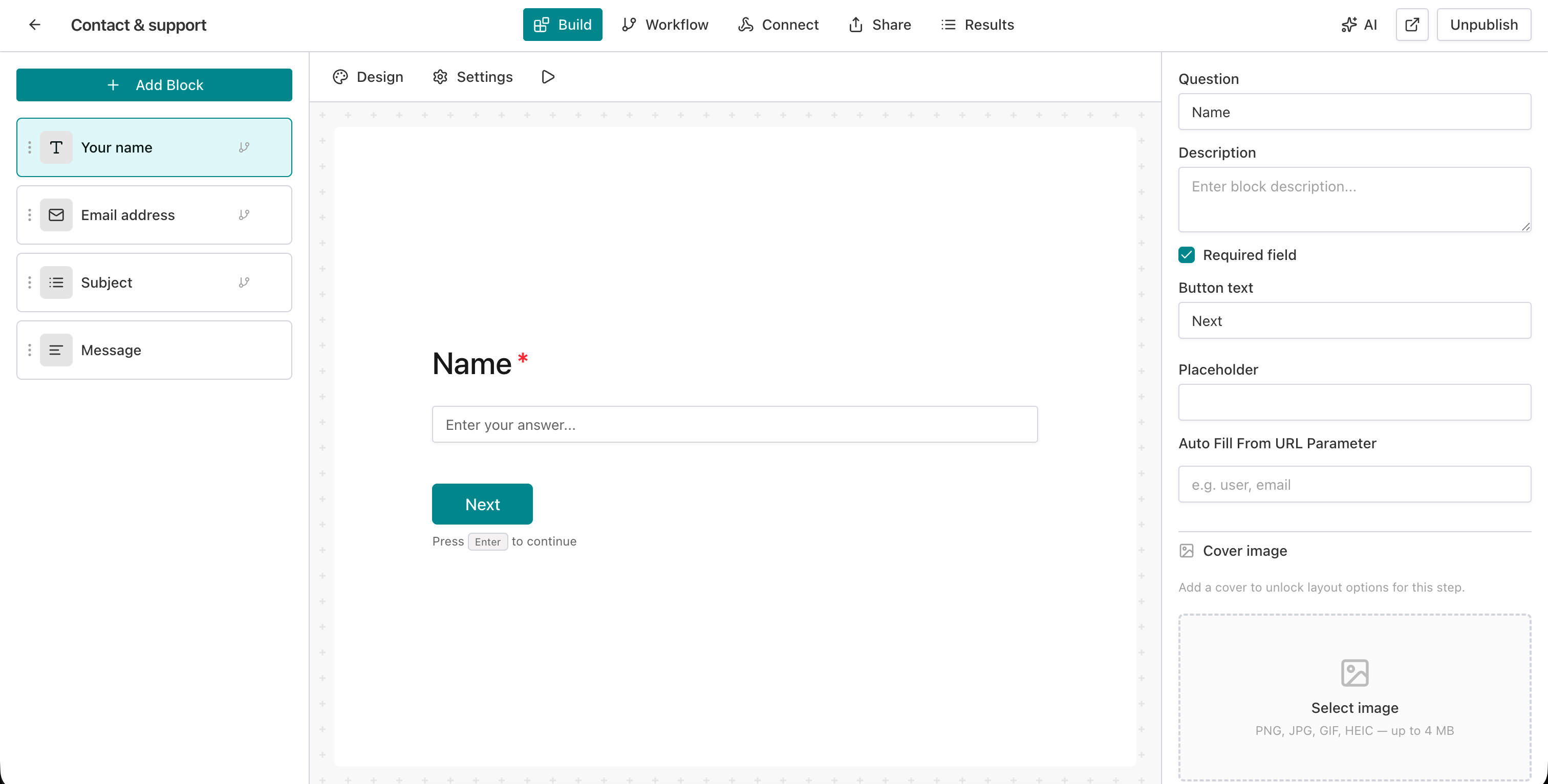
Step 1: Open the form editor
Go to your AntForms workspace and open the form you want to serve on a custom domain.
Step 2: Open Custom Domain settings
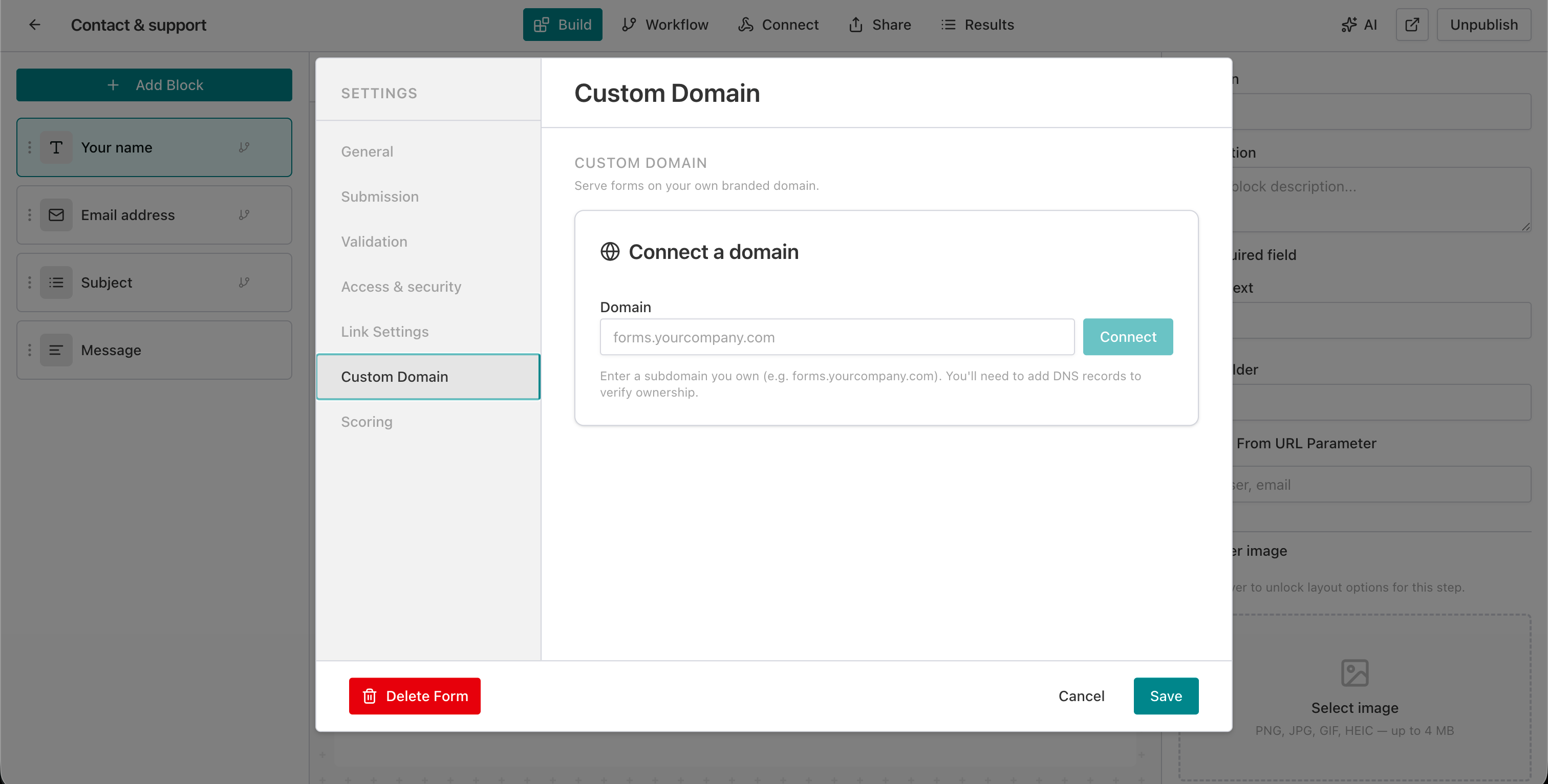
Click the Settings tab in the top navigation, then select Custom Domain from the left-side menu. You see a domain input field with the placeholder forms.yourcompany.com.
Step 3: Enter your subdomain
Type your subdomain into the input field. Use a subdomain you own, such as forms.yourcompany.com or survey.yourbrand.com. Root domains are not supported because CNAME records cannot be set at the DNS root per RFC 1034.
Step 4: Click Connect
Click the Connect button. AntForms registers the domain and generates two DNS records: a CNAME and a TXT record. Both appear in a table with copy buttons.
Step 5: Add the CNAME record
Log in to your DNS provider and create a CNAME record:
- Name: your subdomain (e.g.,
forms) - Value:
custom.antforms.com - Proxy: If you use Cloudflare, set to DNS Only (grey cloud). The orange proxy interferes with SSL provisioning.
Step 6: Add the TXT record
Create a TXT record:
- Name:
_antforms-verify.forms(prefix + your subdomain) - Value: the verification token displayed in AntForms (a UUID string)
Step 7: Verify DNS
AntForms checks DNS every 10 minutes. You can click Check now to trigger a manual check. Most DNS providers propagate records within 5-30 minutes.
Step 8: Wait for SSL
After DNS verification, AntForms provisions a Let’s Encrypt certificate. The status badge shows “SSL provisioning” with a spinner. This takes 1-5 minutes.
Step 9: Confirm Active status
The status badge turns green and shows “Active.” Your forms are now accessible at https://forms.yourcompany.com/form-slug.
Step 10: Share your branded URL
Copy the new URL from the settings panel and share it with your audience. The form loads with your custom branding (logo, colors, fonts) if configured.
DNS records reference
AntForms requires two DNS records: a CNAME for routing and a TXT record for ownership verification, both configured at your DNS provider.
| Record type | Name | Value | Purpose |
|---|---|---|---|
| CNAME | forms (your subdomain) | custom.antforms.com | Routes traffic to AntForms infrastructure |
| TXT | _antforms-verify.forms | antforms-verify={uuid-token} | Proves domain ownership |
DNS provider notes:
| Provider | CNAME proxy | TTL recommendation |
|---|---|---|
| Cloudflare | Set to DNS Only (grey cloud) | Auto |
| Namecheap | N/A | 300 seconds |
| GoDaddy | N/A | 600 seconds |
| Route 53 | N/A | 300 seconds |
| Google Domains | N/A | 300 seconds |
Real-world use cases
Custom domains work for agencies managing client forms, SaaS products embedding surveys, and healthcare providers collecting patient data.
Agency client forms. A marketing agency creates lead capture forms for clients. Each client workspace uses a subdomain like
forms.clientbrand.com. The agency pairs custom domain with custom branding and white-label features for a complete branded experience.SaaS embedded surveys. A SaaS company runs NPS surveys at
feedback.product.com. Combined with Slack integration, responses arrive in the team channel within seconds. The survey URL matches the product domain, so users trust it.Event registration. A conference uses
register.eventname.comfor their registration form. Attendees see a branded URL in email invitations instead of a generic SaaS link.Healthcare intake. A clinic serves patient intake forms at
forms.clinicname.com. Patients verify the URL matches the clinic’s website before entering personal health information.E-commerce order collection. A bakery uses
orders.bakeryname.comfor their branded order form. The URL matches their website, social media links, and printed materials.
Tips for custom domain setup
Use a subdomain, disable Cloudflare proxy, check DNS propagation, and pair custom domain with branding for a full white-label experience.
Use a subdomain, not a root domain.
forms.yoursite.comworks.yoursite.comdoes not. DNS standards require CNAME records on subdomains. Useforms,survey,feedback, orregisteras the subdomain prefix.Disable Cloudflare proxy. If you use Cloudflare, set the CNAME record to DNS Only (grey cloud icon). The orange cloud proxy prevents AntForms from provisioning the Let’s Encrypt certificate.
Check DNS propagation. Use a tool like whatsmydns.net to verify your CNAME and TXT records resolve across DNS servers before clicking Check now in AntForms.
Combine with custom branding. A custom domain paired with custom branding (logo, colors, fonts) creates a fully white-labeled form. Respondents see no trace of AntForms.
Plan for workspace structure. AntForms allows one domain per workspace. If you manage forms for multiple clients, create separate workspaces with separate custom domains.
Pair with Slack for instant notifications. Route form submissions to your team via Slack integration while serving the form on your branded domain.
Test the full URL before sharing. Open
https://forms.yourcompany.com/form-slugin an incognito browser window. Verify the SSL lock icon appears, the form loads, and branding displays.
Comparison: form builder custom domains
AntForms Pro at $18.99/month is the most affordable self-service custom domain among the five major form builders.
| Feature | AntForms | Typeform | Tally | Google Forms | Jotform |
|---|---|---|---|---|---|
| Custom domain | Pro ($18.99/mo) | Enterprise (~$266/mo) | Pro ($29/mo) | Not available | Enterprise (custom pricing) |
| Self-service setup | Yes | Yes | Yes | N/A | No (support ticket) |
| Automatic SSL | Yes (Let’s Encrypt) | Not documented | Yes (Let’s Encrypt) | N/A | Yes (Let’s Encrypt) |
| DNS records | CNAME + TXT | CNAME | Generated in-app | N/A | CNAME |
| Domains per account | 1 per workspace | 1 per account | 1 per workspace | N/A | 1 per account |
| Root domain support | No (subdomain only) | No (subdomain only) | No (subdomain only) | N/A | No (subdomain only) |
| Domain status tracking | 6 states with real-time UI | Not documented | Basic | N/A | Not documented |
| Plan downgrade handling | Domain preserved, re-activates | Not documented | Not documented | N/A | Not documented |
| Verification polling | Auto every 10 min + manual | Not documented | Auto | N/A | Manual via support |
AntForms at $18.99/month is 35% cheaper than Tally ($29/mo) and 93% cheaper than Typeform Enterprise (~$266/mo). Jotform requires Enterprise pricing and a support ticket. Google Forms has no custom domain support at any price. AntForms is the only builder that preserves domain configuration during plan downgrades, so re-subscribing does not require DNS re-setup.
Limitations to know
AntForms custom domain has six constraints: subdomain only, one per workspace, manual DNS, 48-hour timeout, Cloudflare proxy conflict, and no wildcards.
AntForms custom domain covers the core use case of serving forms on a branded subdomain. Six constraints apply.
Subdomain only, no root domains. AntForms requires a CNAME record, which DNS standards (RFC 1034) do not allow on root domains. You must use a subdomain like forms.yoursite.com. Some DNS providers support ALIAS or ANAME records for root domains, but AntForms does not verify these record types.
One domain per workspace. Each workspace supports one custom domain. All forms in that workspace are accessible through that domain. If you need multiple branded domains (e.g., for different clients), create separate workspaces.
Manual DNS configuration. AntForms does not integrate with DNS provider APIs. You copy the CNAME and TXT values from the settings panel and add them to your DNS provider. We evaluated automatic DNS configuration via Cloudflare and Route 53 APIs but chose manual setup because it works with all 50+ DNS providers without requiring API credentials.
48-hour verification timeout. If DNS records do not resolve within 48 hours (288 verification checks at 10-minute intervals), the domain status changes to Failed. You must remove the domain and re-add it to restart verification. During development, we tested shorter timeouts but found that some enterprise DNS providers take 24-36 hours to propagate changes.
Cloudflare proxy conflict. Cloudflare users must disable the orange cloud proxy for the CNAME record. The proxy intercepts TLS handshakes and prevents AntForms from issuing a Let’s Encrypt certificate. According to Caddy’s TLS-on-demand documentation, proxied DNS breaks the ACME HTTP-01 challenge because the proxy terminates the connection before Caddy can respond. This affects all form builders that use on-demand TLS, not just AntForms.
No wildcard domains. AntForms does not support wildcard certificates or wildcard subdomains (e.g., *.yoursite.com). Each subdomain must be configured and verified on its own. We chose single-domain provisioning to keep the SSL pipeline simple and avoid the complexity of DNS-01 ACME challenges required for wildcards.
Key takeaways
- AntForms custom domain serves your forms at a URL you own, like
forms.yourcompany.com, with automatic SSL. - Setup requires adding a CNAME and TXT record to your DNS provider. AntForms verifies DNS and provisions a Let’s Encrypt certificate in 1-5 minutes.
- Pro plan at $18.99/month. The cheapest self-service custom domain among Typeform ($266/mo), Tally ($29/mo), and Jotform (Enterprise only).
- One domain per workspace. All forms in the workspace are accessible through that domain.
- Six domain status states (Pending, DNS Verified, SSL Provisioning, Active, Failed, Disabled) with real-time UI updates and auto-polling every 10 minutes.
- Domain configuration survives plan downgrades. Re-subscribing re-enables the domain without DNS re-setup.
- Combine with custom branding for a complete white-label experience where respondents see no trace of AntForms.
- Pair with webhooks or Slack to create a branded form with real-time submission routing.