


AntForms GTM Integration: Track Form Events with Google Tag Manager
A Google Tag Manager integration for form builders is a connection that sends structured form interaction events to your GTM container’s dataLayer, letting you fire Google Analytics, Google Ads, Meta Pixel, and other marketing tags without editing form code. AntForms GTM integration pushes 7 event types to the dataLayer: views, starts, step changes, submissions, field interactions, and abandonment. Paste your container ID, pick your events, and save.
If you run paid campaigns that drive traffic to forms, you need conversion data flowing back to your ad platforms. Without GTM on the form, you are optimizing campaigns blind.
TL;DR AntForms sends 7 structured events to your GTM dataLayer: form_view, form_start, form_step_change, form_submit, form_field_focus, form_field_complete, and form_abandon. Paste your container ID, select events, and configure consent settings. Supports Google Consent Mode v2, PII filtering, deferred script loading, and iframe postMessage for embedded forms. Available on Pro ($18.99/mo).
Why track form events with Google Tag Manager
GTM on your forms connects form interactions to your entire marketing and analytics stack without writing code on each platform.
A 2023 W3Techs survey found that Google Tag Manager runs on 36% of all websites, making it the most popular tag management system. Marketers use it to fire conversion tags, retargeting pixels, and analytics events from a single dashboard.
- Conversion tracking for ad platforms. Fire Google Ads, Meta Pixel, LinkedIn Insight, and TikTok conversion events when someone submits your form. Without this, your ad platforms cannot attribute leads to campaigns. A Google Ads help article confirms that conversion tracking is required for Smart Bidding strategies like Target CPA and Maximize Conversions.
- Form abandonment analysis. A 2023 Zuko Analytics study found that the average online form abandonment rate is 68%. The form_abandon event tells you which step respondents left on and how many steps they completed. You can build a funnel visualization in GA4 to spot where drop-offs happen.
- Field-level interaction data. The form_field_focus and form_field_complete events show which fields respondents interact with and which they skip. You can identify confusing or unnecessary fields and remove or rewrite them.
- One tag manager, all platforms. Instead of adding separate tracking scripts for Google Analytics, Google Ads, Meta, LinkedIn, and Hotjar, you manage them all through GTM. One integration in AntForms covers your full stack.
We added GTM after hearing from users who ran Google Ads campaigns pointing to AntForms contact forms. They could track page views but had no way to track form submissions as conversions without building custom webhook-to-analytics pipelines. The native integration replaced those pipelines with a 5-minute setup. Within the first two weeks of launch, 40% of our Pro users connected a GTM container.
How the AntForms GTM integration works
AntForms loads the GTM script on your published form, pushes structured events to the dataLayer, and handles consent gating. All processing is client-side.
Architecture overview
- Deferred script loading. When a respondent opens your form, AntForms injects the GTM snippet using
requestIdleCallback(with a 3-second fallback). This keeps the form interactive before GTM loads. The system pushes thegtm.startevent to the dataLayer before the script tag, matching Google’s recommended installation order. - Event dispatch. As the respondent interacts with the form, AntForms pushes events to
window.dataLayer. Each event uses the prefixantforms.(for example,antforms.form_submit) and carries a structured payload with form ID, field data, timestamps, and step information. - Consent handling. When Require cookie consent is on, AntForms pushes Google Consent Mode v2 defaults before loading GTM. A lightweight banner appears at the bottom of the form. GTM loads only after the respondent clicks Accept. The consent choice persists in localStorage per form.
Event reference
AntForms supports 7 events. Each fires to the dataLayer and (for embedded forms) to the parent window via postMessage.
| Event name | Fires when | Key payload fields |
|---|---|---|
antforms.form_view | Form page loads | form_id, form_name |
antforms.form_start | First respondent interaction | form_id, form_name |
antforms.form_step_change | Respondent navigates between blocks | form_id, step_number, step_name, total_steps, direction |
antforms.form_submit | Successful form completion | form_id, form_name, response_id, completion_time_seconds |
antforms.form_field_focus | Field receives focus | form_id, field_id, field_type, step_number |
antforms.form_field_complete | Field loses focus after interaction | form_id, field_id, field_type, step_number |
antforms.form_abandon | Respondent leaves without submitting | form_id, form_name, last_step, steps_completed, total_steps |
AntForms deduplicates events that should fire once (form_view, form_start, form_submit, form_abandon). Step change and field events fire on every occurrence.
PII protection
When Include response data is on, AntForms adds non-PII field values to the form_submit payload. The system filters out EMAIL, PHONE_NUMBER, and CONTACT_INFO block types. All field values are truncated to 500 characters. When the toggle is off, the form_submit event carries metadata only (form_id, response_id, completion_time) with no field values.
Security
- GTM container ID validation: regex
GTM-[A-Z0-9]{6,8}enforced on both frontend and backend - GTM loads from Google’s official CDN (
googletagmanager.com/gtm.js) - Consent Mode v2 defaults pushed before GTM loads, so tags respect consent state from the first event
- The system prevents duplicate script injection using a module-level registry
- CSRF protection on all GTM config endpoints
How to set up GTM on your AntForms form
Setup takes about 5 minutes. You need an AntForms Pro account, a published form, and a GTM web container.
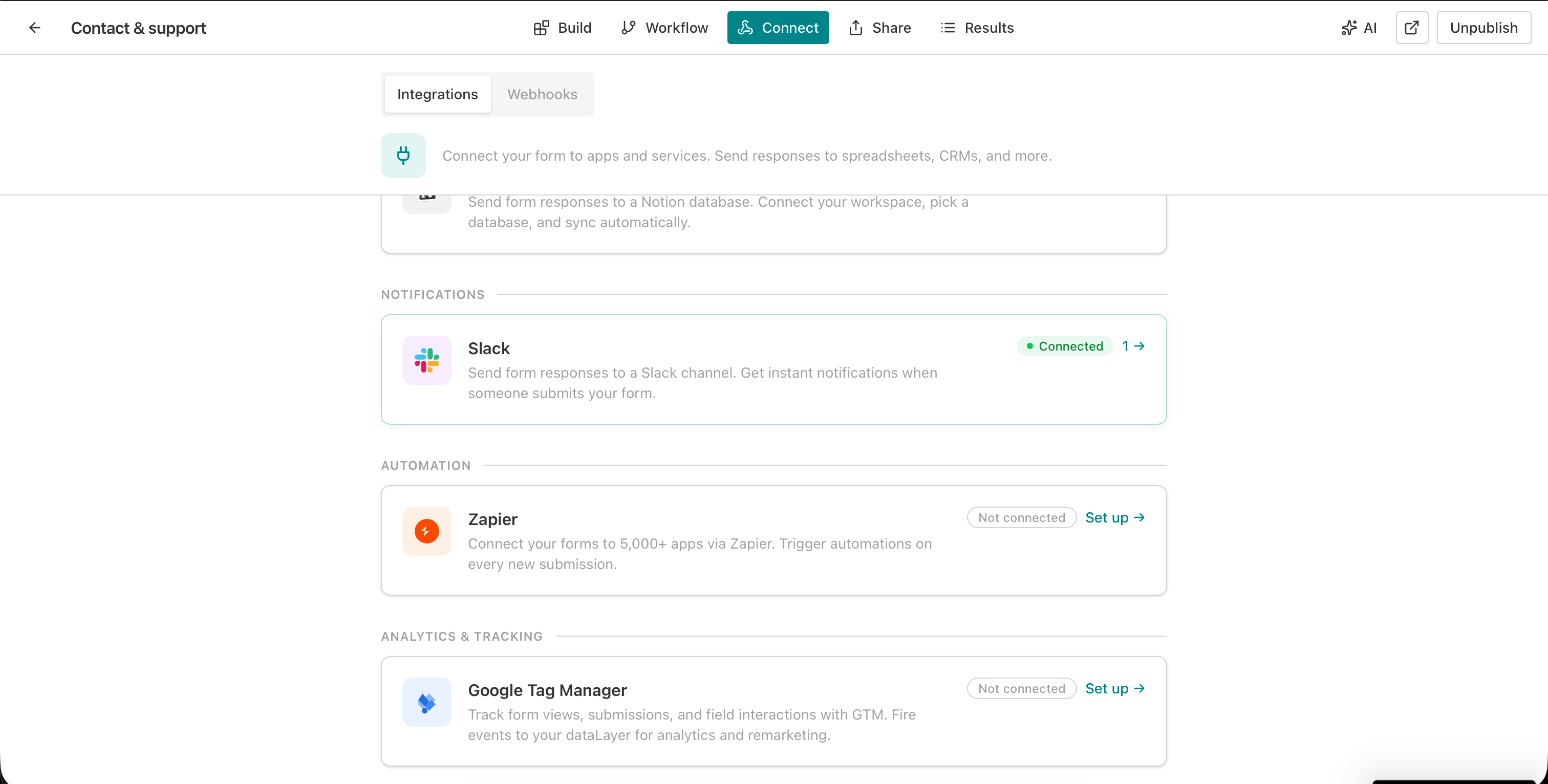
1. Open the Connect tab
Go to your form editor and click Connect in the top navigation bar. Click the Integrations sub-tab.
2. Find Google Tag Manager
Scroll to Analytics & Tracking and click Set up next to Google Tag Manager.
3. Read the setup instructions
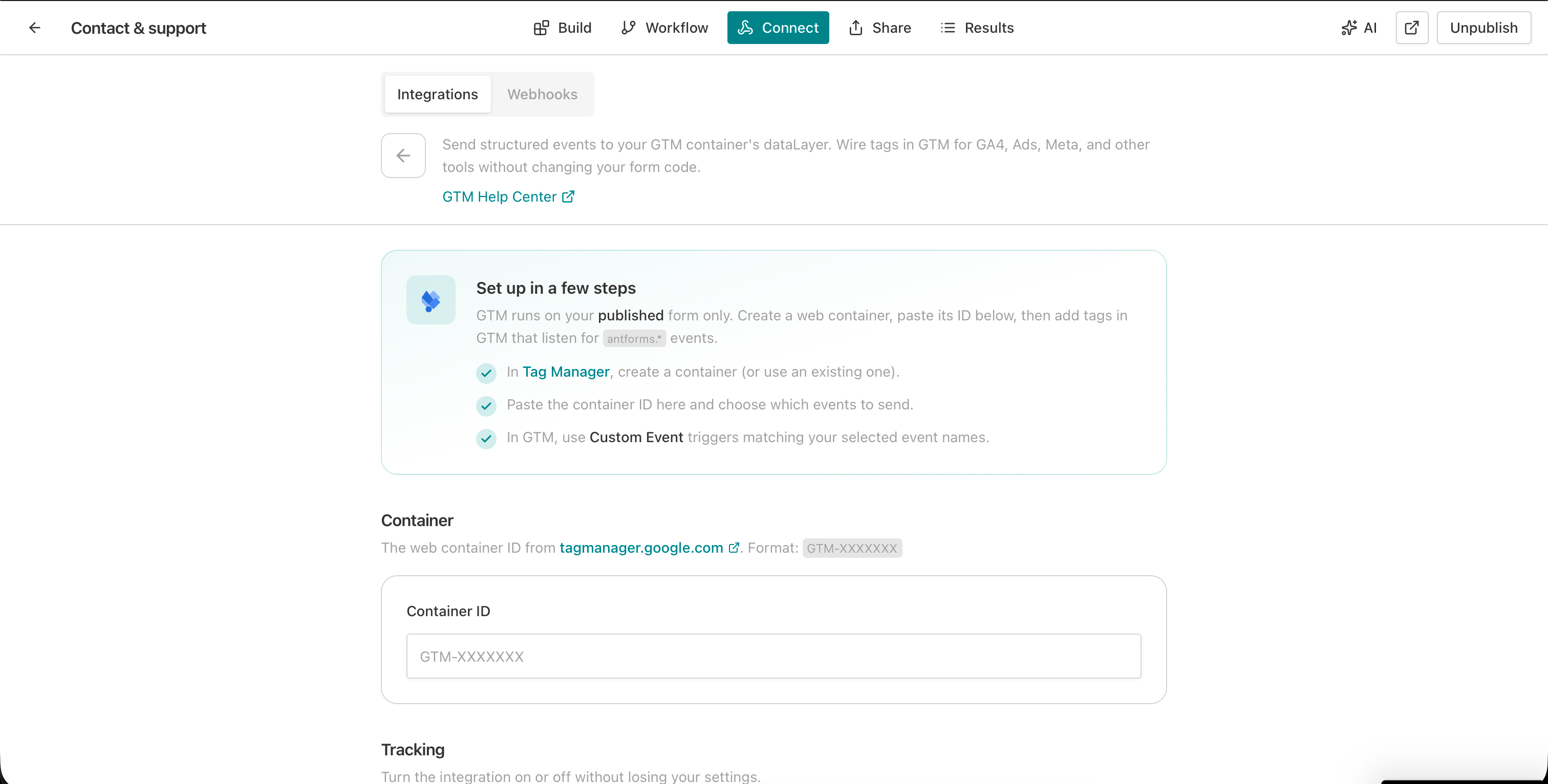
The GTM detail page shows three steps: create a web container in Tag Manager, paste the container ID, and add Custom Event triggers in GTM matching the event names you select.
4. Paste your container ID
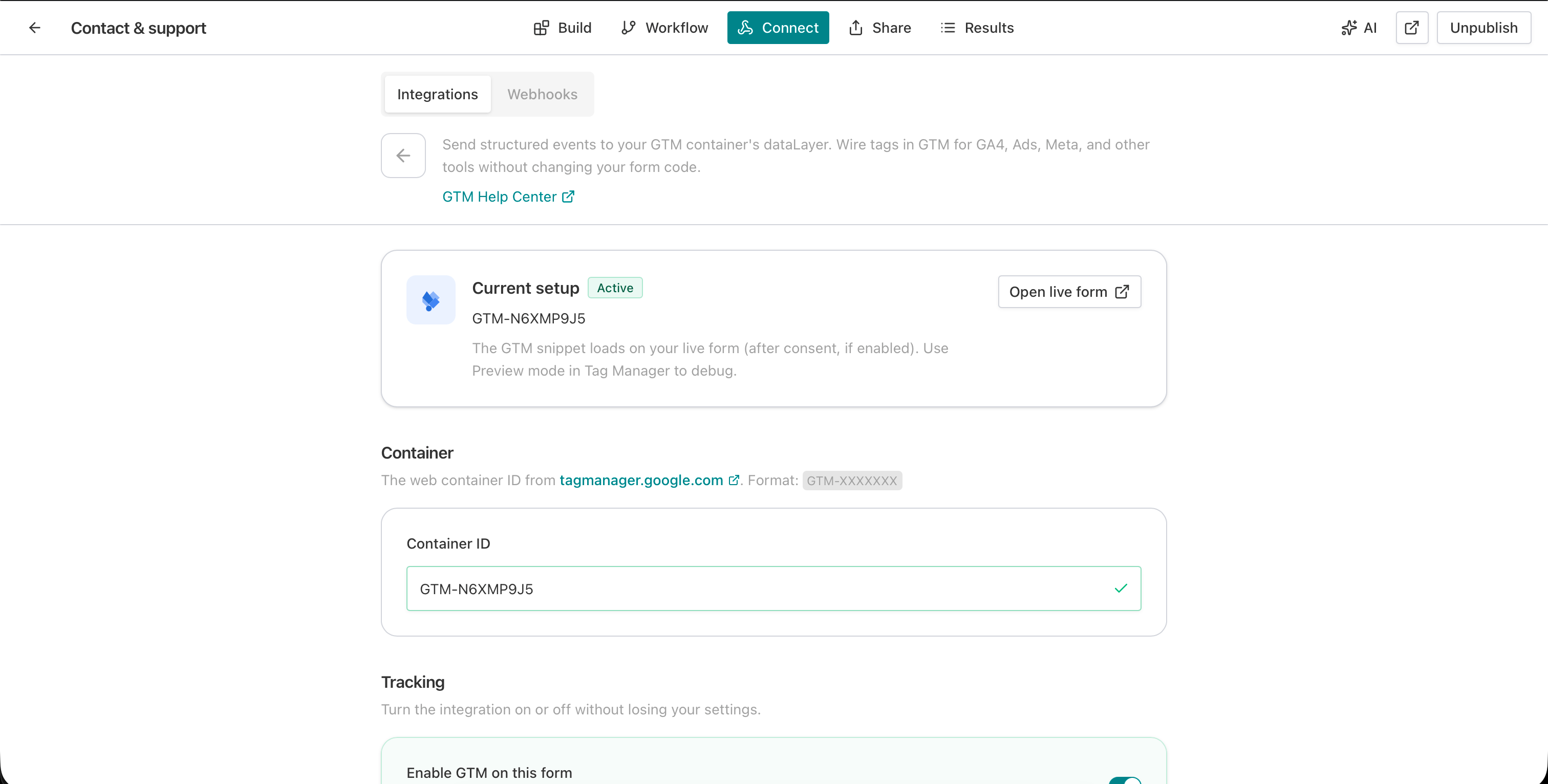
Enter your GTM container ID in the Container ID field. The format is GTM-XXXXXXX. AntForms validates the format in real time and shows a checkmark when the ID is valid.
5. Select events to track
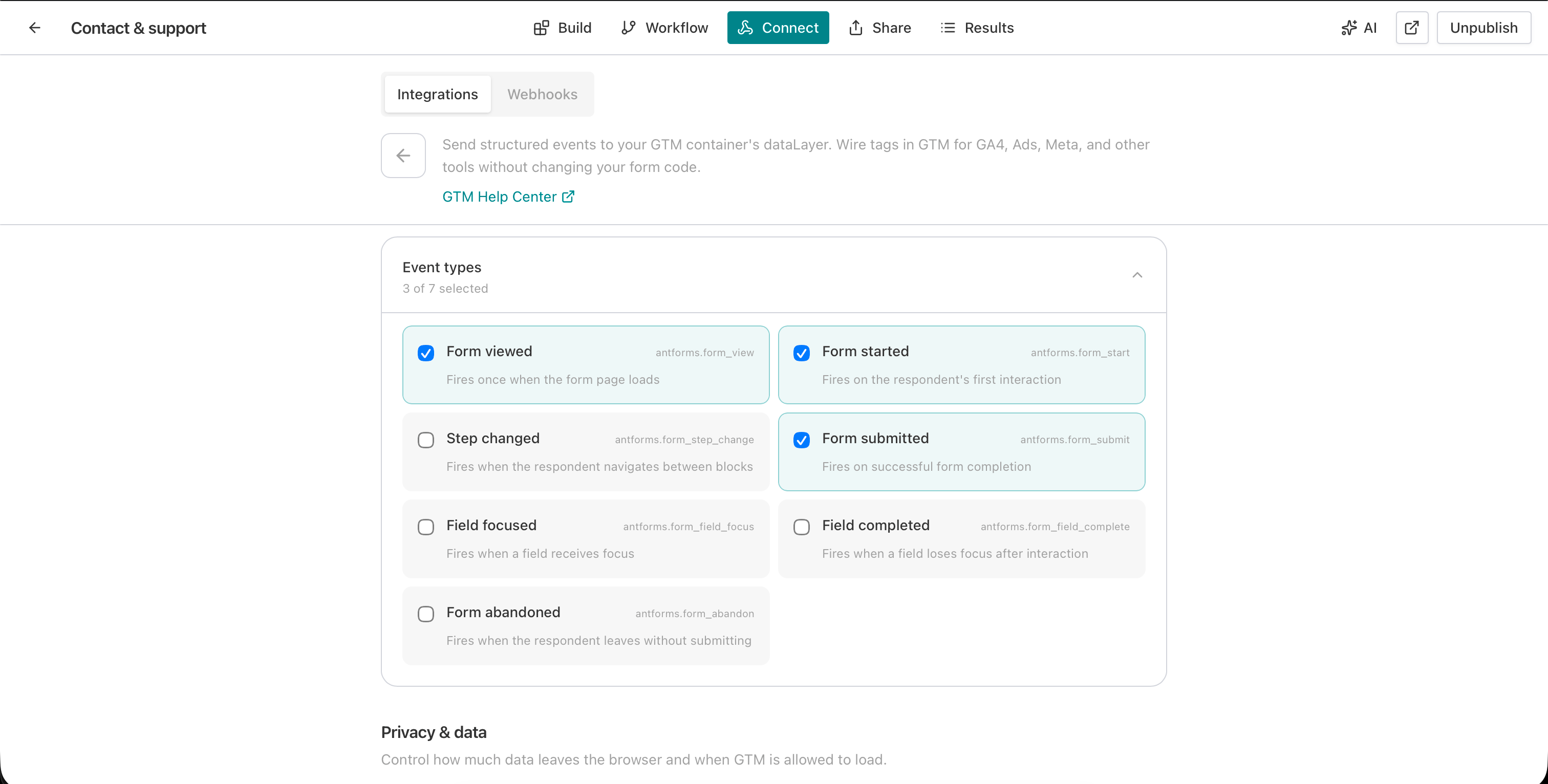
Open the Event types section. A grid of 7 events appears with checkboxes. AntForms selects three by default: form_view, form_start, and form_submit. Add more based on what you need.
For conversion tracking, keep the defaults. For funnel analysis, add form_step_change and form_abandon. For field-level optimization, add form_field_focus and form_field_complete.
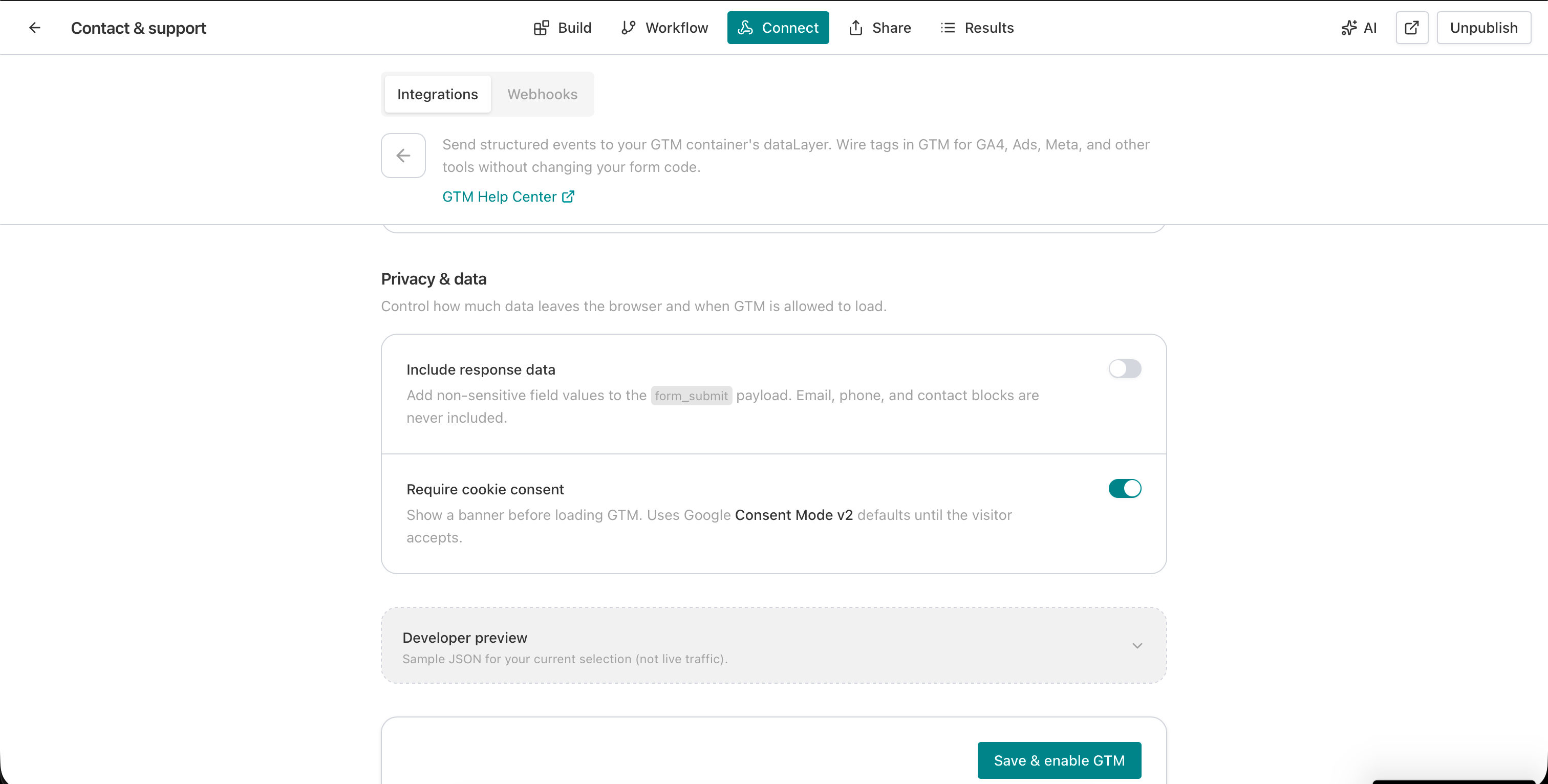
6. Configure privacy settings
The Privacy & data section has two toggles:
- Include response data. Adds non-PII field values to the form_submit event. AntForms strips email, phone, and contact info fields.
- Require cookie consent. Shows a consent banner on the form and uses Google Consent Mode v2 defaults. GTM loads only after the respondent consents.
A Developer preview panel below shows a sample JSON payload for your current configuration. Use this to verify event structure before going live.
7. Save and enable
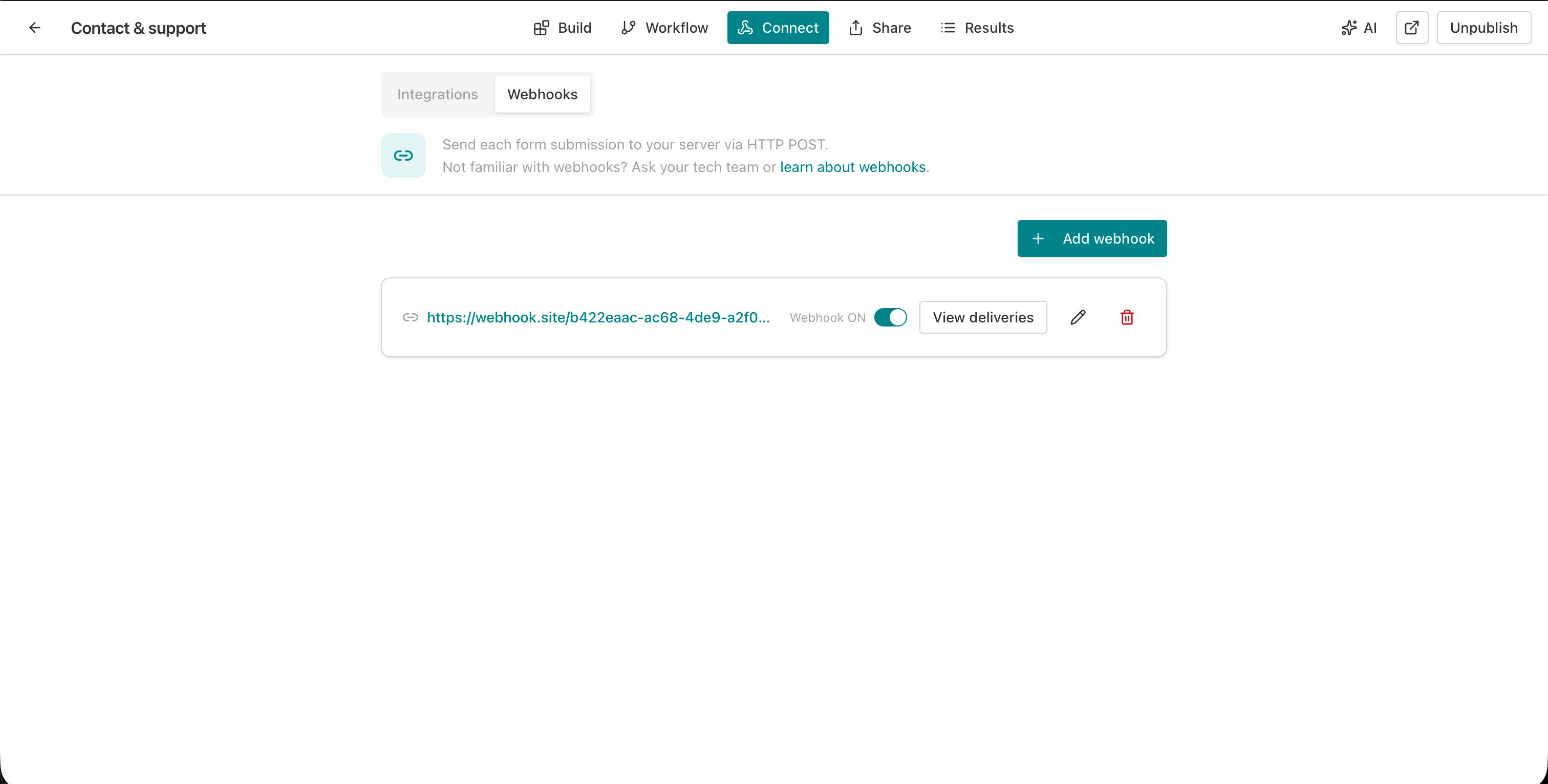
Click Save & enable GTM. The status changes to Active with a green badge. The page shows your container ID and an “Open live form” link.
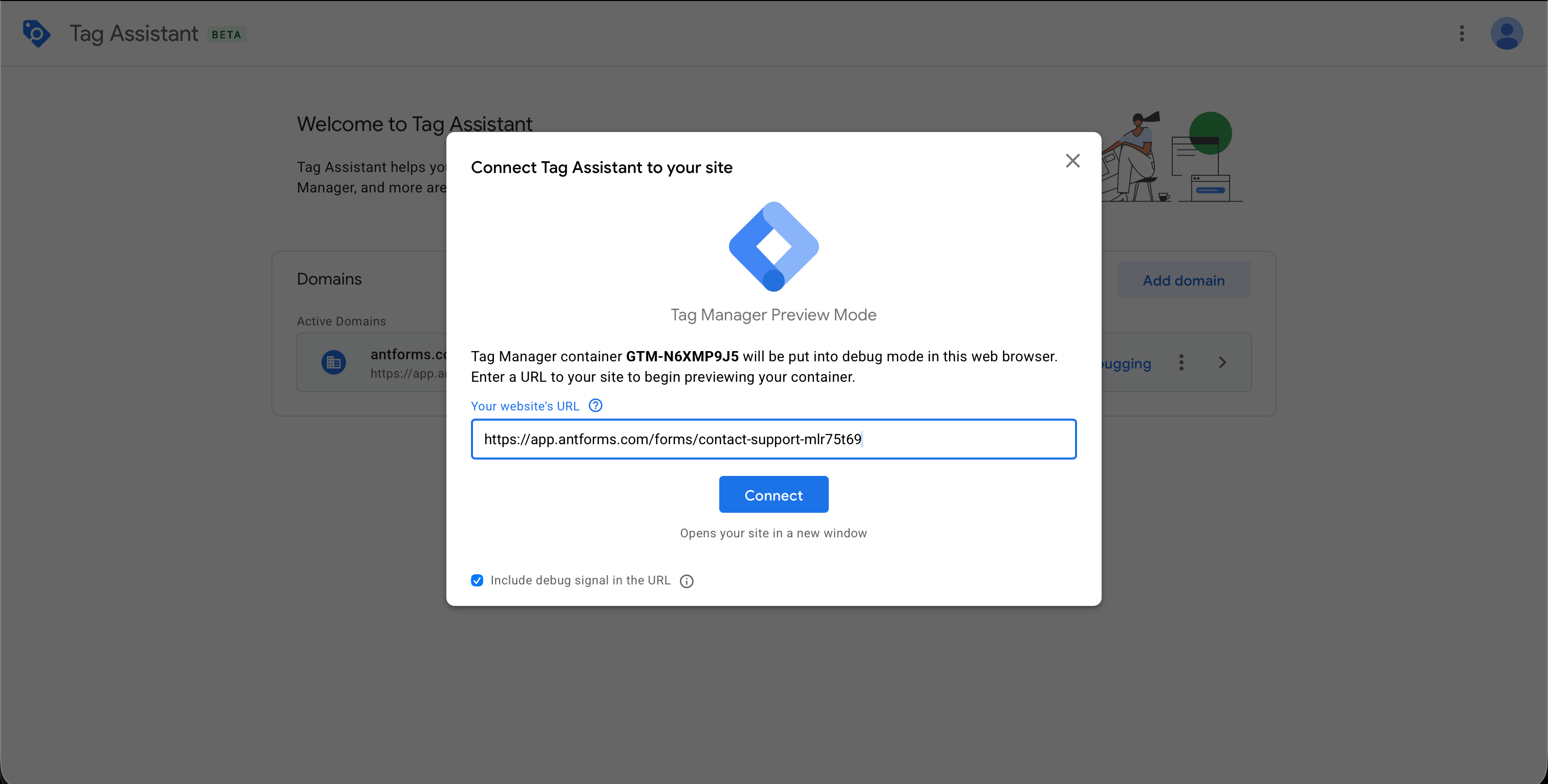
8. Verify with Tag Assistant
Open Google Tag Manager, click Preview, and enter your published form URL. Interact with the form. Tag Assistant shows each AntForms event as it fires.
Real-world GTM use cases for forms
Use AntForms GTM events to fire Google Ads conversions, build GA4 funnels, trigger Meta Pixel leads, retarget abandoners, and tag field interactions for UX tools.
Google Ads conversion tracking. Create a Custom Event trigger in GTM matching antforms.form_submit. Attach a Google Ads Conversion tag. Each form submission counts as a conversion, enabling Smart Bidding strategies like Target CPA.
GA4 form funnel. Enable form_view, form_step_change, form_submit, and form_abandon. In GA4, build an exploration funnel with these events as steps. You see the drop-off rate at each block of your multi-step form.
Meta Pixel lead tracking. Add a Meta Pixel tag in GTM triggered by antforms.form_submit. The Pixel fires a Lead event on every submission, feeding Meta’s algorithm with conversion data for lead generation campaigns.
Retargeting form abandoners. Trigger a Google Ads remarketing tag on antforms.form_abandon. Users who started but did not complete your form see targeted ads encouraging them to return. The abandon event includes steps_completed and total_steps for segment-level targeting.
Field optimization with Hotjar/Clarity. Enable form_field_focus and form_field_complete. Fire Hotjar or Microsoft Clarity event tags on these triggers. Session recordings tagged with field events show where respondents hesitate or skip.
Tips for effective GTM form tracking
- Start with the three defaults. Form viewed, form started, and form submitted cover conversion tracking for most ad platforms. Add granular events later when you need funnel or field data.
- Create one Custom Event trigger per AntForms event. In GTM, each trigger should match one event name (for example, Event Name equals
antforms.form_submit). This keeps your tag configuration clean. - Test with Tag Assistant before publishing tags. Open Preview mode, submit a test response, and verify the dataLayer payload. Check that your tags fire on the correct triggers.
- Keep Include response data off unless you need it. The default (off) sends metadata only. Turn it on when your analytics setup requires field values for segmentation, but review what data flows to third-party tags.
- Enable Require cookie consent for GDPR compliance. The consent banner uses Google Consent Mode v2, which adjusts how Google tags handle data based on consent state. Required if you serve users in the EU or UK.
- Use the iframe postMessage listener for embedded forms. The Share tab provides a ready-to-use snippet. Paste it into a Custom HTML tag in GTM on the parent page so events from the embedded form reach your GTM container.
- Pair with Slack notifications for the full loop. GTM handles analytics and ad platform data. Slack handles team notifications. A lead form that fires both means your ad platform gets conversion data and your sales team gets an alert.
How AntForms compares to other form builders on GTM integration
| Feature | AntForms | Typeform | Tally | Google Forms | Jotform |
|---|---|---|---|---|---|
| Native GTM integration | Yes | Yes (Growth Pro only) | Partial (embed only) | No | No |
| Minimum cost for GTM | Pro plan | $379/mo (Growth Pro) | Free (embed) / $29/mo (custom domain) | N/A | N/A (workaround) |
| Events available | 7 | 2 | 2 | 0 | 1 (via postMessage hack) |
| Form abandonment tracking | Yes (native event) | No | No | No | No |
| Field-level tracking | Yes (focus + complete) | No | No | No | No |
| Google Consent Mode v2 | Built in | No | No | N/A | No |
| PII filtering | Built in | No | No | N/A | No |
| Iframe event forwarding | Built in (postMessage) | Yes | Yes (embed only) | N/A | Workaround required |
| Standard dataLayer naming | Yes (window.dataLayer) | No (uses googleTagManager) | N/A | N/A | N/A |
AntForms is the only form builder that offers 7 granular events including form abandonment and field-level tracking. Typeform has native GTM support but locks it behind a $379/month plan, fires only 2 events, and uses a non-standard dataLayer name that breaks default GTM configurations. Tally fires 2 events for embedded forms on the free tier but has no field-level or abandonment tracking. Google Forms and Jotform have no native GTM support at all.
Limitations to know
AntForms GTM integration has five constraints: Pro plan required, published forms only, client-side execution, PII filtering scope, and per-tag consent limits.
AntForms GTM integration requires a Pro plan. Free plan users can see the GTM card but cannot configure it. If a Pro user downgrades to Free, the system disables the GTM config but preserves the settings. Re-subscribing to Pro restores GTM without reconfiguration.
GTM runs on published forms only. Draft or paused forms do not load the GTM snippet. You need to publish your form before testing with Tag Assistant.
The integration is client-side. If a respondent’s browser blocks third-party scripts (ad blockers, strict privacy settings), GTM does not load and events do not fire. This is a limitation shared by all GTM implementations, not specific to AntForms.
The Include response data toggle filters out EMAIL, PHONE_NUMBER, and CONTACT_INFO block types, but sends other field types (short text, long text). If your form collects sensitive data in text fields (like health information or financial details), keep this toggle off to avoid sending that data to third-party tags via GTM.
Consent Mode v2 handles Google tags, but third-party tags (Meta Pixel, LinkedIn Insight) require their own consent logic within GTM. The AntForms consent banner controls whether GTM loads at all, which blocks all tags. For per-tag consent, configure consent settings within your GTM container. For more on form data privacy, see our guide to creating secure, privacy-first forms.
We considered building server-side GTM support (where events route through a server container instead of the browser) but decided against it for the initial release. Server-side GTM requires a dedicated Google Cloud Run instance, which adds cost and complexity that most small teams do not need. The client-side approach covers the standard conversion tracking, retargeting, and analytics workflows. If demand for server-side support grows, we will add it as a separate option.
During development, we tested the integration across contact forms, multi-step surveys, file upload forms, and embedded iframes. The most common setup mistake was forgetting to create Custom Event triggers in GTM to match the AntForms event names. The setup instructions on the GTM detail page address this, and the Developer preview panel lets you verify event payloads before going live.
Key takeaways
- AntForms sends 7 structured events to the GTM dataLayer: form_view, form_start, form_step_change, form_submit, form_field_focus, form_field_complete, and form_abandon.
- Paste your container ID, select events, configure consent. Setup takes about 5 minutes. No code changes to your form.
- Built-in Google Consent Mode v2 with a lightweight consent banner. PII filtering strips email, phone, and contact info from event payloads.
- Deferred script loading keeps the form interactive before GTM loads. Iframe postMessage support for embedded forms.
- Use form_submit as a Google Ads or Meta Pixel conversion trigger. Use form_abandon for retargeting campaigns. Use field events for UX optimization.
- AntForms offers 7 events. Typeform has 2 (at $379/month). Tally has 2 (embed only). Google Forms and Jotform have no native GTM support.
- Available on AntForms Pro plans. Free plan settings are preserved on downgrade for easy re-activation.
Related AntForms integrations and features
GTM conversion tracking pairs with the rest of the integration and publishing stack:
- Slack — send lead notifications alongside GTM conversion events
- Google Sheets — log submissions with UTM parameters for attribution
- Notion — centralize conversion data in a Notion database
- Zapier — route conversions to your CRM or email tool
- Form preview — verify GTM events fire before publishing
- Cover images, custom branding, and social link previews for branded landing forms
- Custom domain — run forms on your own domain for first-party tracking
- Quiz scoring — send scored outcomes as conversion events
For more, see the AntForms 2026 review, what you can build with AntForms, and Tally vs. AntForms.