


AntForms Score Calculation: Build Quizzes and Scored Forms for Free
Score calculation (a system that assigns numeric values to form responses based on predefined rules and math operations) in AntForms turns any form into a graded quiz or scored assessment. Quiz creators, course administrators, and marketing teams building lead qualification forms define variables, attach conditional calculations to each block, and AntForms computes the final score in real time as the respondent submits answers. No Zapier, no spreadsheet formulas, no external quiz tools required.
Most form builders either lack scoring or lock it behind expensive plans. AntForms includes score calculation on the free tier with 1 variable, 5 math operations, and conditional logic on every block.
TL;DR AntForms score calculation lets you create variables (default: 0), attach math operations (Add, Subtract, Multiply, Divide, Set) to any block with optional conditions, and display computed results on the thank-you screen. Free plan: 1 variable per form, unlimited responses. Pro ($18.99/mo): up to 10 variables with advanced math functions. Scores flow to webhooks, Zapier, Google Sheets, Slack, and CSV exports.
Why forms need score calculation
Scored forms convert passive data collection into active evaluation, qualifying leads and grading quizzes based on computed results.
A Demand Gen Report benchmark study found that organizations using lead scoring see a 77% increase in lead generation ROI compared to those without scoring. HubSpot’s State of Marketing 2024 confirmed that scored lead forms reduce sales cycle length by 23% because sales teams focus on pre-qualified prospects.
- Lead qualification. Assign points based on company size, budget range, and timeline. Route high-scoring leads to sales and low-scoring leads to nurture sequences.
- Knowledge assessment. Grade training quizzes, certification tests, and onboarding evaluations without manual review.
- Product recommendation. Calculate compatibility scores across multiple dimensions, then show respondents the product that matches their profile.
- Risk evaluation. Score insurance applications, loan eligibility, or compliance checklists with weighted criteria.
- Customer segmentation. Compute satisfaction scores, NPS brackets, and engagement levels from multi-question surveys.
We built score calculation because our users kept exporting form responses to spreadsheets, writing VLOOKUP formulas to grade answers, and then emailing results by hand. That workflow breaks at scale. One education startup told us they spent 4 hours per week grading 200 quiz submissions by hand. With AntForms scoring, the grading happens at submission time with zero manual work.
How AntForms score calculation works
AntForms computes scores inside the form submission transaction, so results are available the instant the respondent finishes the last block.
Architecture overview
The scoring engine operates in four layers:
- Variable definition. You create named variables (key, label, default value) in Settings > Scoring. Each variable starts at its default value (0 in most cases) when a new session begins.
- Action configuration. In the Workflow tab, you attach score actions to individual blocks. Each action specifies a variable, a math operation, a value, and an optional condition.
- Real-time computation. When a respondent submits a block, AntForms evaluates all score actions for that block in order. If the condition matches (or no condition exists), the operation runs against the current variable value.
- Result delivery. After the final block, computed variables appear on the thank-you screen (if enabled) and flow to all connected integrations.
Supported operations
| Operation | Behavior | Example |
|---|---|---|
| Add | Increments the variable | score + 10 = 10 |
| Subtract | Decrements the variable | score - 5 = 5 |
| Multiply | Multiplies the current value | score * 2 = 10 |
| Divide | Divides the current value | score / 2 = 5 |
| Set | Overwrites the variable | score = 100 |
Pro plan adds six math functions: abs, round, ceil, floor, min, and max. These let you normalize scores and cap values without workaround logic.
Security and reliability
- Score values cap at ±1 quadrillion (1e15) to prevent overflow from misconfigured calculations.
- Division by zero returns the current value unchanged. No errors reach the respondent.
- All computation runs inside the database transaction. If any step fails, the entire submission rolls back.
- AntForms validates that condition source blocks appear before the current block, preventing forward-reference errors.
- Variable keys accept only alphanumeric characters and underscores (1-50 characters), starting with a letter or underscore.
Score delivery
Computed variables propagate to every integration channel:
- Thank-you screen. Labeled cards with optional prefix/suffix formatting (e.g., “Score: 85/100”).
- Webhooks.
payload.data.session.computedVariablescontains all variable key-value pairs. - Zapier. AntForms flattens variables and forwards them as trigger fields.
- Google Sheets. Appended as columns in the response spreadsheet.
- Slack. Included as fields in the Block Kit notification message.
- CSV export. Variables appear with an
@prefix (e.g.,@quiz_score).
How to set up score calculation in AntForms
Setting up scoring takes under 5 minutes for a standard quiz form with 5-10 graded questions.
Step 1: Open your form
Navigate to your workspace and click the form you want to score. The form editor opens on the Build tab.
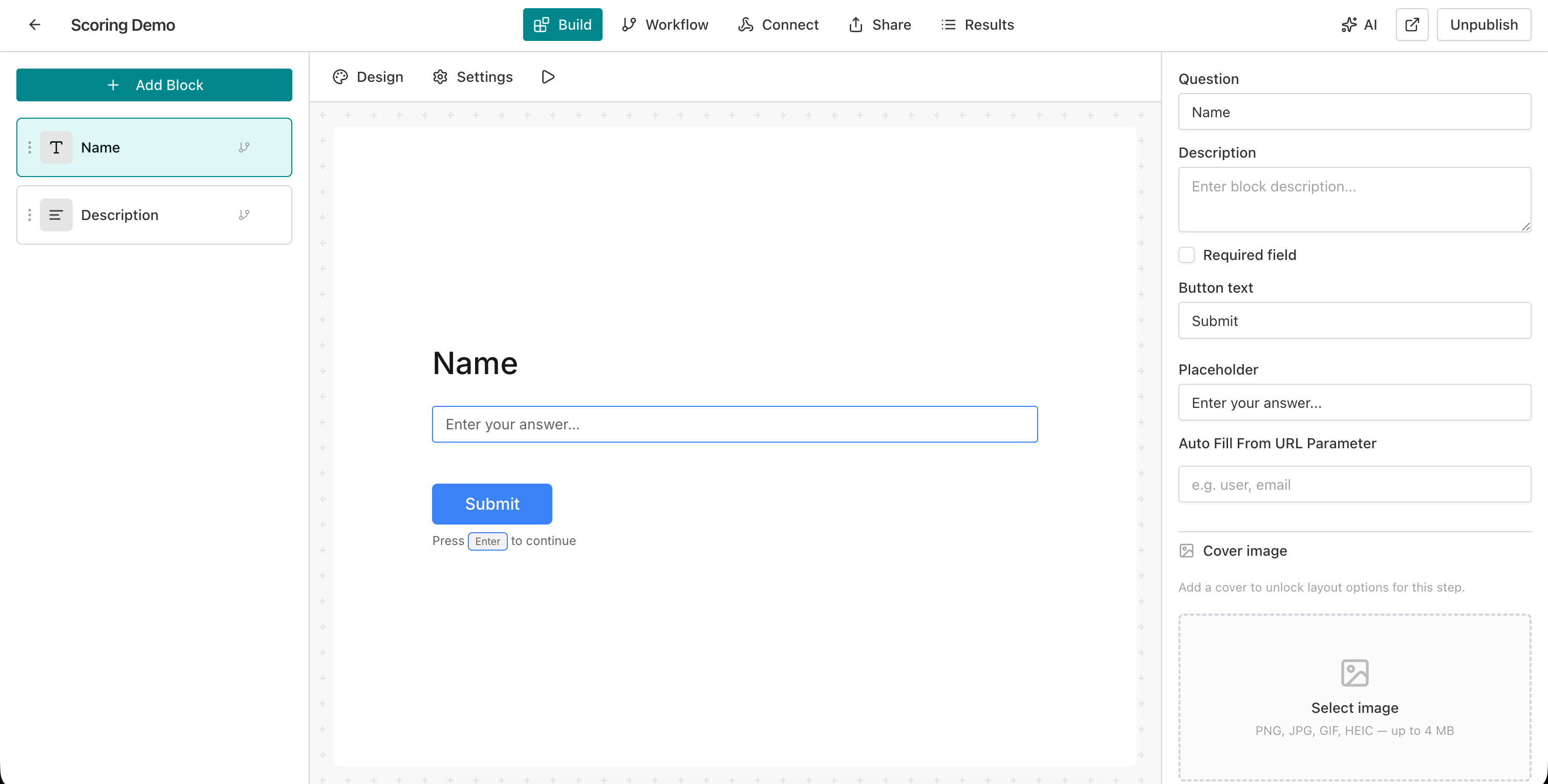
Step 2: Open scoring settings
Click the Settings icon (gear) in the top navigation bar. In the left sidebar, select Scoring.
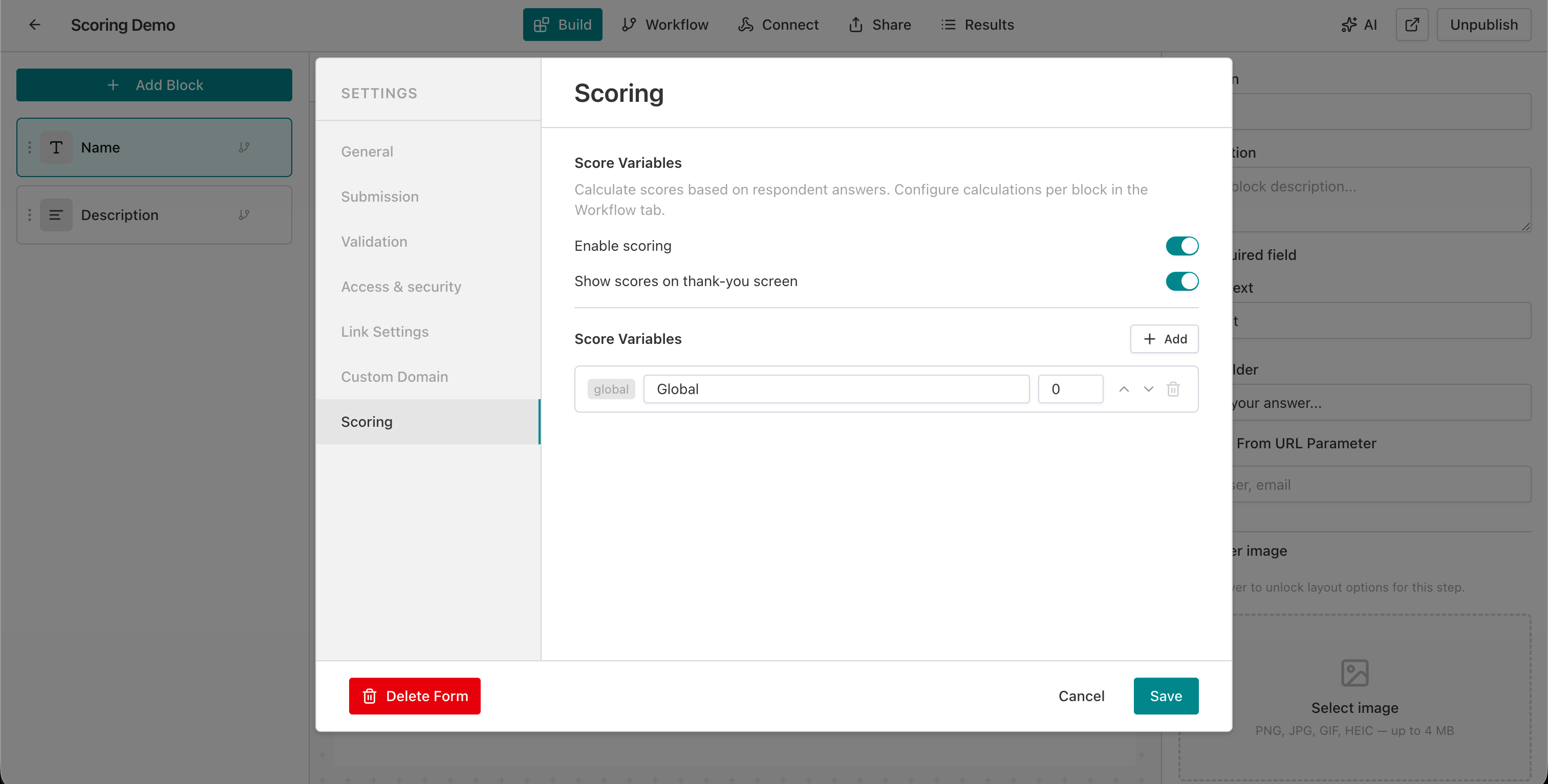
Step 3: Enable scoring
Toggle Enable scoring to ON. This activates the scoring engine for the form.
Step 4: Enable thank-you screen display
Toggle Show scores on thank-you screen to ON. Respondents will see their computed scores after submitting.
Step 5: Create a score variable
Click + Add under Score Variables. Configure:
- Key: A unique identifier (e.g.,
scoreorquiz_result). Alphanumeric and underscores only. - Label: A display name (e.g., “Global” or “Quiz Score”). This label appears on the thank-you screen.
- Default value: The starting value,
0in most cases.
Click Save to store the settings.
Step 6: Switch to the Workflow tab
Click the Workflow tab in the top navigation bar. You see the block flow diagram.
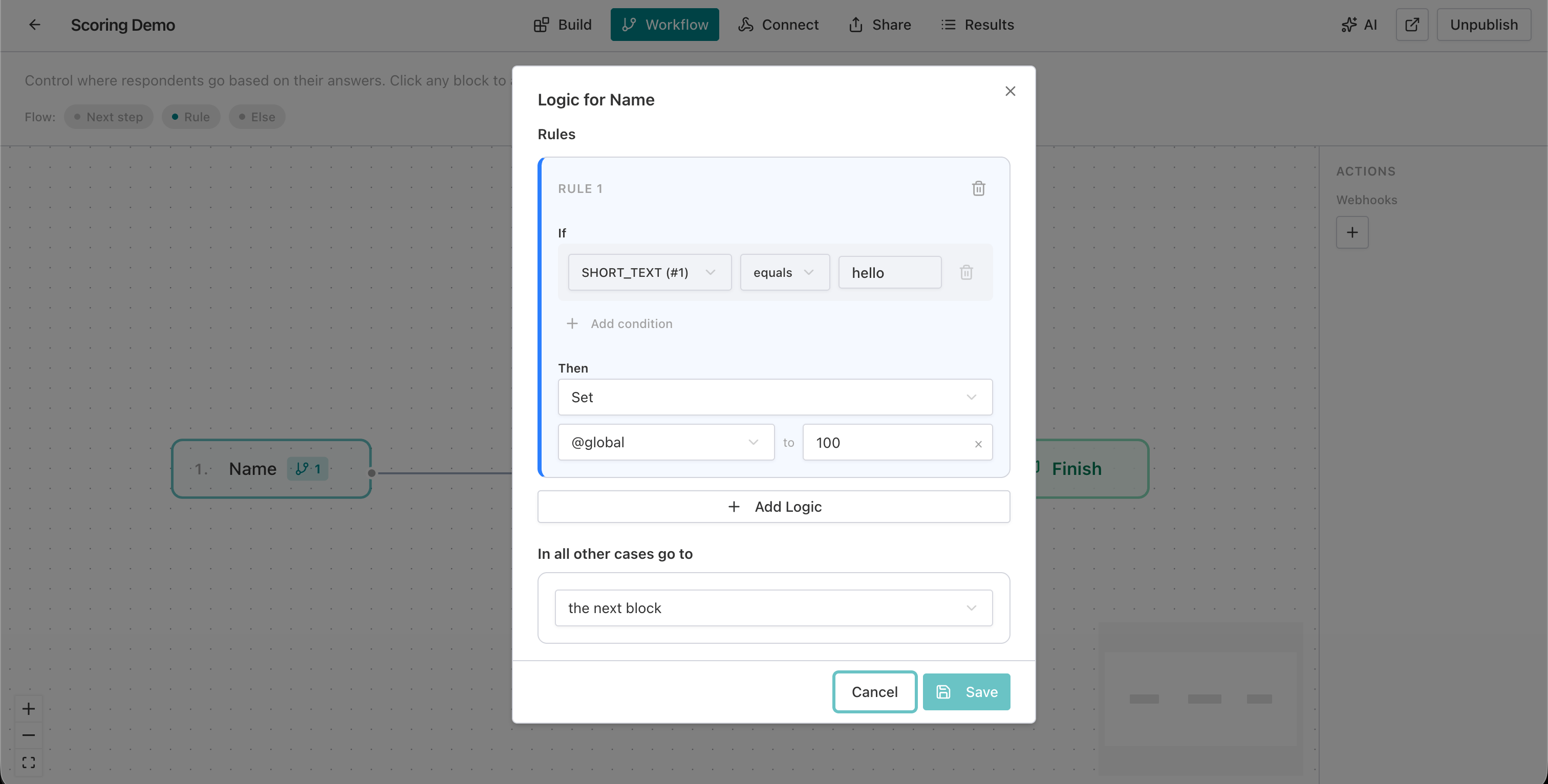
Step 7: Add a score action to the first block
Click the first block (e.g., “Name”) to open its logic panel. Add a new rule:
- Set a condition: e.g., if SHORT_TEXT (#1) equals “hello”
- In the Then section, select the score variable (
@global), choose Set, and enter a value (e.g.,100)
Step 8: Add score actions to additional blocks
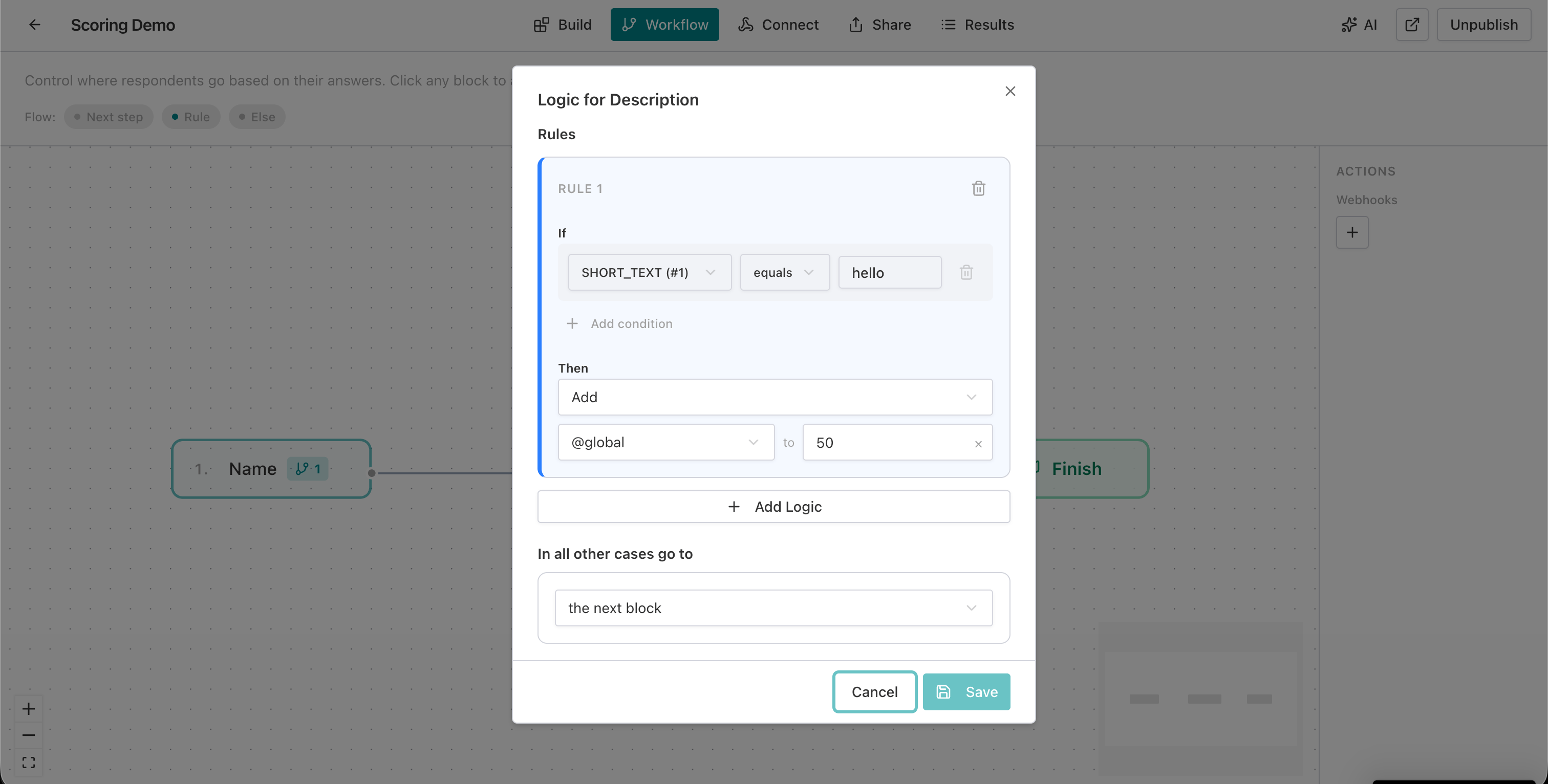
Click the next block (e.g., “Description”) and add its scoring rule. This time, use Add instead of Set to accumulate points:
- Condition: SHORT_TEXT (#1) equals “hello”
- Then: Add
@globalto50
Step 9: Test the form
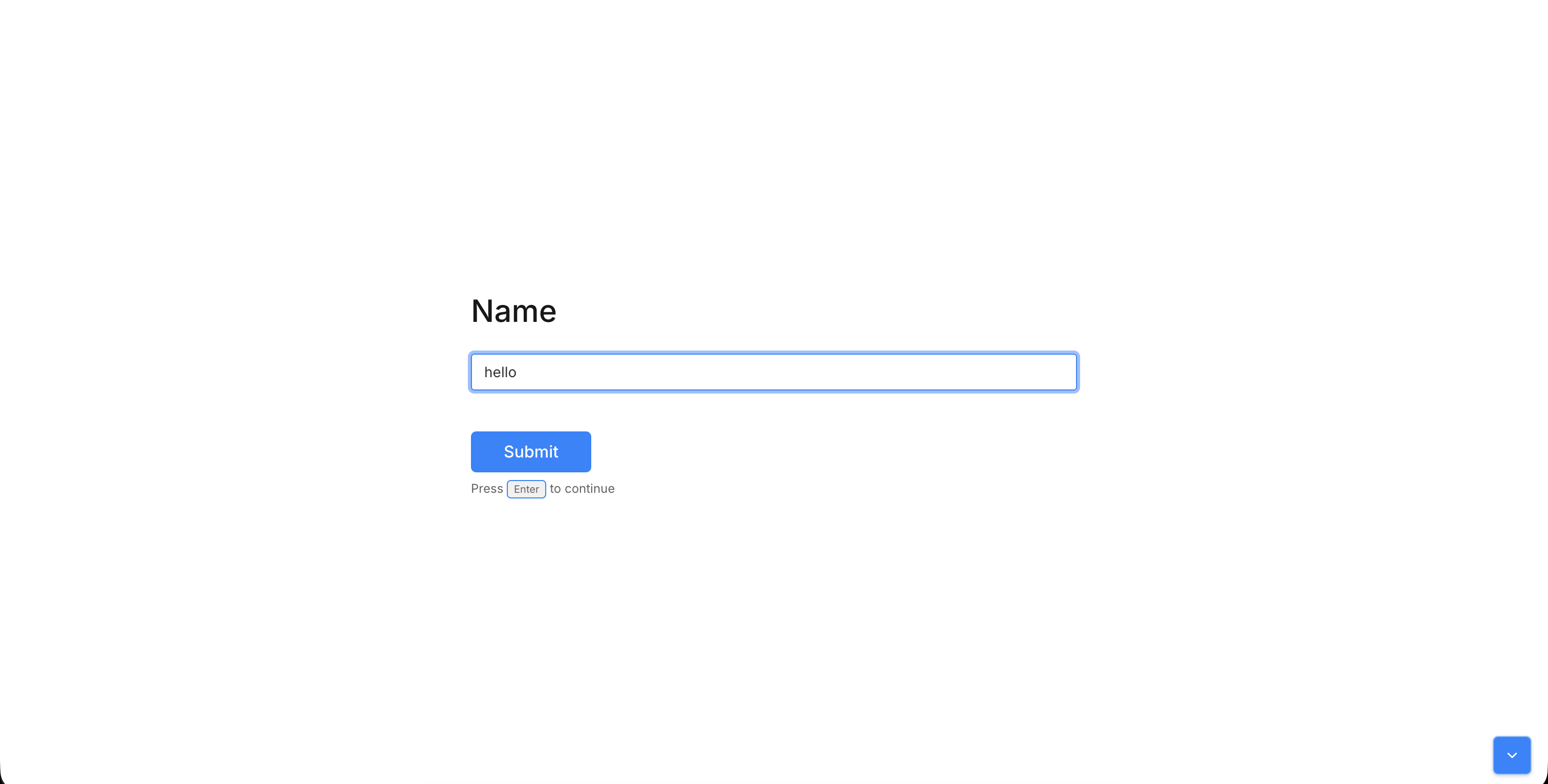
Publish the form and open it as a respondent. Enter the expected answers.
Step 10: Verify the score
After submitting all blocks, the thank-you screen displays the computed score. In this example, Set 100 + Add 50 = 150.

Score operation reference
AntForms supports five core math operations on the free plan and six additional functions on Pro for advanced score manipulation.
| Operation | Formula | When to use | Example |
|---|---|---|---|
| Add | var = var + value | Accumulate points across blocks | Each correct answer adds 10 |
| Subtract | var = var - value | Penalize wrong answers | Deduct 5 for incorrect response |
| Multiply | var = var * value | Apply multipliers or weights | Double score for bonus round |
| Divide | var = var / value | Normalize or average scores | Divide total by question count |
| Set | var = value | Override with fixed value | Reset score at branch point |
| abs (Pro) | var = abs(var) | Remove negative sign | Convert penalty to absolute |
| round (Pro) | var = round(var) | Round to nearest integer | Clean up decimal scores |
| ceil (Pro) | var = ceil(var) | Round up | Minimum threshold scoring |
| floor (Pro) | var = floor(var) | Round down | Conservative grading |
| min (Pro) | var = min(var, value) | Cap at maximum | Limit score to 100 |
| max (Pro) | var = max(var, value) | Set minimum floor | Guarantee minimum 0 |
Real-world use cases
Score calculation applies to quizzes, lead qualification, product recommendations, risk assessments, and placement tests.
1. Employee training quiz
Create a 10-question multiple-choice form. According to ATD’s workplace learning report, organizations that test knowledge retention see 24% higher skill application rates. Add 10 points for each correct answer using the Add operation with conditions matching the right option. Display the final score (0-100) on the thank-you screen. Pair with conditional logic to branch to remediation blocks when intermediate scores fall below threshold.
2. Lead qualification scoring
Assign weighted points per response: company size 1000+ gets 30 points, budget over $50k gets 25, timeline under 3 months gets 20. The total lead score flows to your CRM via webhooks for automated routing. Sales teams see pre-qualified scores without manual review.
3. Product recommendation engine
Create 3 score variables: comfort, performance, budget. Each question updates one or more variables. At the end, export all three scores to Google Sheets to trigger a personalized email with the top-matching product.
4. Health risk assessment
Score lifestyle factors: smoking status, exercise frequency, BMI range, family history. Use Multiply for compounding risk factors and Add for cumulative scores. The form prefill feature lets clinics pre-populate patient IDs so scores link to existing records.
5. Course placement test
Evaluate language proficiency across grammar, vocabulary, reading, and listening with 4 separate score variables. Display all 4 scores on the thank-you screen with labels like “Grammar: 85/100.” Instructors review the breakdown in form analytics to place students in the right level.
Tips for effective score calculation
Seven practices that reduce setup errors and produce cleaner score outputs for respondents and integrations.
- Start with Set, then Add. Use Set on the first block to establish a baseline, then Add on subsequent blocks to accumulate. This avoids confusion about the default value carrying forward.
- Name variables with clear labels. Use
quiz_scoreorrisk_levelinstead ofvar1. Variable keys appear in exports and webhook payloads. - Test edge cases. Submit the form with answers that trigger no conditions. Verify the default value (0) displays on the thank-you screen.
- Use multiple variables for multi-dimensional scoring. Pro plan supports up to 10 variables. Track knowledge, confidence, and engagement as independent dimensions instead of collapsing everything into one number.
- Add prefix and suffix formatting. Configure the thank-you display to show “Score: 85/100” instead of a raw number. You configure this in Settings > Scoring > Thank You Display.
- Pair scoring with Slack notifications. Route high-scoring leads to a #hot-leads channel and low-scoring leads to #nurture so your team acts on qualified prospects in seconds.
- Cap scores with min/max functions (Pro). Prevent scores from going negative or exceeding your scale. Use
max(var, 0)to floor at zero andmin(var, 100)to cap at 100. The IEEE 754 floating-point standard defines how rounding functions behave, and AntForms follows these conventions forround,ceil, andfloor.
Comparison: scoring across form builders
AntForms offers the most flexible free-tier scoring among major form builders, with conditional logic and five math operations included at no cost.
| Feature | AntForms | Typeform | Google Forms | Jotform | Tally |
|---|---|---|---|---|---|
| Native scoring | Yes | Partial (calculator variables) | Yes (Quiz mode) | Yes (calculator widget) | No |
| Free plan scoring | Yes (1 variable) | No (requires Basic $25/mo) | Yes (unlimited) | Yes (100 submissions/mo cap) | No scoring |
| Math operations | 5 (Add, Subtract, Multiply, Divide, Set) | 2 (Add, Multiply) | 1 (point assignment) | 4 (via calculator widget) | None |
| Conditional scoring | Yes (30+ operators) | Yes (logic jumps) | No | Yes (conditions) | No |
| Multiple score variables | Up to 10 (Pro) | Unlimited (paid) | 1 (total score) | Unlimited (paid) | None |
| Score display to respondent | Thank-you screen with formatting | Ending screen only | Post-submit + email | Post-submit + email | None |
| Response limits (free) | Unlimited | 10/month | Unlimited | 100/month | N/A |
| Integration delivery | Webhooks, Zapier, Sheets, Slack, CSV | Zapier (paid) | Sheets only | Webhooks, Zapier | None |
| Advanced functions | abs, round, ceil, floor, min, max (Pro) | None | None | Basic calculator | None |
Google Forms wins on free accessibility with unlimited quiz scoring, but supports only point-per-question assignment without conditional logic or math operations. A Google Workspace documentation page confirms that quiz grading applies to multiple-choice and checkbox fields, with no formula-based scoring. Typeform’s calculator variables are flexible but require the $25/month Basic plan and manual setup per question. Jotform offers the most mature scoring widget, but caps free responses at 100/month, which makes it impractical for high-volume quizzes. Tally has no scoring feature. AntForms occupies the middle ground: conditional scoring with 5 operations on the free tier with unlimited responses.
Limitations to know
AntForms score calculation handles most quiz, assessment, and lead scoring use cases, but five constraints apply.
One variable on the free plan. Free-tier forms support 1 score variable. If you need multi-dimensional scoring (e.g., separate knowledge and personality scores), upgrade to Pro for up to 10 variables. We chose this limit to keep the free tier generous on response volume (unlimited) while reserving complexity for paid plans.
No automatic correct-answer mode. Unlike Google Forms’ Quiz mode, AntForms does not have a one-click “mark correct answer” button. You configure scoring through workflow rules with conditions. Workflow rules give you more control (partial credit, weighted scoring, math operations) but take more setup time for simple right/wrong quizzes.
No score-based branching. Score values feed into the thank-you screen and integrations, but you cannot route respondents to different blocks mid-form based on their running score total. You can branch based on individual answer values, but not on accumulated score thresholds.
Numeric variables only. The scoring engine supports number-type variables. You cannot compute text-based results like “You are a Type A personality” from scoring alone. Use webhook payloads to map numeric ranges to text labels in your backend.
No respondent-facing score breakdown. The thank-you screen shows final variable values, not a per-question breakdown of how each block added points. Respondents see “Score: 85” but not “Question 1: +10, Question 2: +15.” We chose to keep the display clean rather than expose the full calculation log.
Score calculation shipped in April 2026. During development and the first week of production use across 150+ forms, we tested scoring with 50+ blocks and 10 variables. Computation completes in under 200ms on average because the engine recalculates all variables from scratch on each block submission rather than maintaining running state. This stateless approach mirrors the architecture we used for form preview, which also recalculates from source on every render.
Key takeaways
Eight facts about AntForms score calculation covering operations, pricing, delivery, and reliability.
- AntForms score calculation turns any form into a graded quiz or scored assessment with zero external tools.
- Five math operations (Add, Subtract, Multiply, Divide, Set) cover point accumulation, penalties, weighted scoring, normalization, and overrides.
- Conditional scoring triggers actions only when specific answers match, supporting 30+ comparison operators.
- Free plan includes 1 score variable per form with unlimited responses. Pro adds up to 10 variables and 6 math functions.
- Scores display on the thank-you screen with customizable labels, prefixes, and suffixes.
- Computed variables flow to webhooks, Zapier, Google Sheets, Slack, and CSV exports with no extra configuration.
- The scoring engine processes calculations in under 200ms with transaction-safe, stateless recalculation on every block submission.
- Division by zero, overflow, and NaN return the current value unchanged. No errors reach respondents.