


AntForms Social Link Preview: Customize OG Images and Meta Tags for Forms
Social link preview in AntForms is the ability to control how your form links appear when shared on Facebook, LinkedIn, X (formerly Twitter), Slack, and WhatsApp by setting custom Open Graph (OG) images, titles, descriptions, and favicons. AntForms generates both OG and Twitter Card meta tags from your settings. No code editing required.
This guide is for marketers, founders, and teams who share form links on social media and want those links to look professional. A form link with a branded image and clear title gets more clicks than a bare URL with no preview.
TL;DR AntForms social link preview lets you set a custom OG title (60 chars), OG description (155 chars), OG image (1200x630), and favicon per form. Title and description are free. Image and favicon upload require Pro ($18.99/mo). AntForms outputs Open Graph and Twitter Card meta tags. Live preview card shows how links look before you share.
Why social link previews matter for forms
Custom OG previews increase click-through rates on shared form links by replacing blank thumbnails with branded images and clear descriptions.
- Click-through rates. A BuzzSumo analysis of 100 million Facebook posts found that posts with images receive 2.3x more engagement than text-only posts. A form link with no OG image renders as a plain text URL on most platforms. Adding a 1200x630 image turns it into a visual card.
- Brand consistency. Your form link preview should match your website, email templates, and ad creative. A Lucidpress brand consistency study found that consistent branding increases revenue by up to 23%.
- Trust signals. A link preview with your company name, a professional image, and a clear description reassures the recipient that the link is legitimate. This matters for form links shared via email or messaging apps where phishing is common.
- Platform coverage. Facebook, LinkedIn, X, Slack, WhatsApp, Telegram, and iMessage all render OG meta tags. One set of OG tags controls how your form link appears across all these platforms.
We built social link preview because users shared form links on Slack and LinkedIn and got blank, unbranded previews. Over a 3-month period, 40% of support tickets about “how my form link looks” traced back to missing OG tags. Free-tier users can set title and description. Pro users can upload custom images because image processing and R2 storage have infrastructure costs.
How AntForms social link preview works
AntForms stores your OG settings per form, processes uploaded images server-side, and serves meta tags in the HTML head of your public form page.
Architecture overview
The social link preview system has four layers:
- Settings storage. Each form stores
ogTitle,ogDescription,siteName,themeColor, andnoIndexin its settings JSON. OG image and favicon URLs are stored as separate fields (ogImageUrl,faviconUrl) with their own asset lifecycle. - Image processing. When you upload an OG image, AntForms resizes it to 1200x630 pixels and encodes it as JPEG at 85% quality using Sharp (a Node.js image processing library). If the result exceeds 300 KB, AntForms re-encodes at lower quality for WhatsApp compatibility. Favicons resize to 128x128 PNG at 90% quality.
- Meta tag output. The public form page renders Open Graph tags (
og:title,og:description,og:image,og:type,og:url), Twitter Card tags (twitter:card,twitter:title,twitter:description,twitter:image), canonical URL, and favicon link. If you set a custom image, AntForms uses thesummary_large_imageTwitter Card type for a full-width image preview. - Cache busting. AntForms appends a timestamp query parameter (
?v={timestamp}) to image URLs. When you update your OG image, the new URL forces social platform crawlers to fetch the fresh version instead of serving a cached copy.
Image upload pipeline
AntForms does not receive your image file on the API server. Three steps handle the upload:
- Presigned upload. The browser requests a presigned URL from the API. The URL expires in 15 minutes and targets Cloudflare R2.
- Direct R2 upload. The browser sends the file straight to R2. AntForms servers never touch the raw file bytes.
- Server-side processing. A BullMQ worker picks up the job, runs the Sharp pipeline (resize to 1200x630, encode to JPEG at 85%, compress for WhatsApp if needed), and moves the file from staging to its final R2 key.
The frontend polls asset status every 1-3 seconds (starting at 1 second, backing off to 3 seconds after 30 seconds). Maximum polling time is 5 minutes.
Security
- Plan enforcement blocks free-tier users from uploading images. Attempting to upload returns a
403 SEO_PLAN_REQUIREDerror. - Staging key validation prevents cross-workspace and cross-form asset access. Directory traversal patterns (
..,/) are rejected. - Stale uploads older than the presign TTL auto-fail, preventing permanent resource blocking.
- Rate limiting caps SEO asset requests at 20 per workspace per 15 minutes.
How to set up social link preview
Configure your form’s social link preview in the Link Settings panel. Title and description take 2 minutes. Image upload adds another 3 minutes.
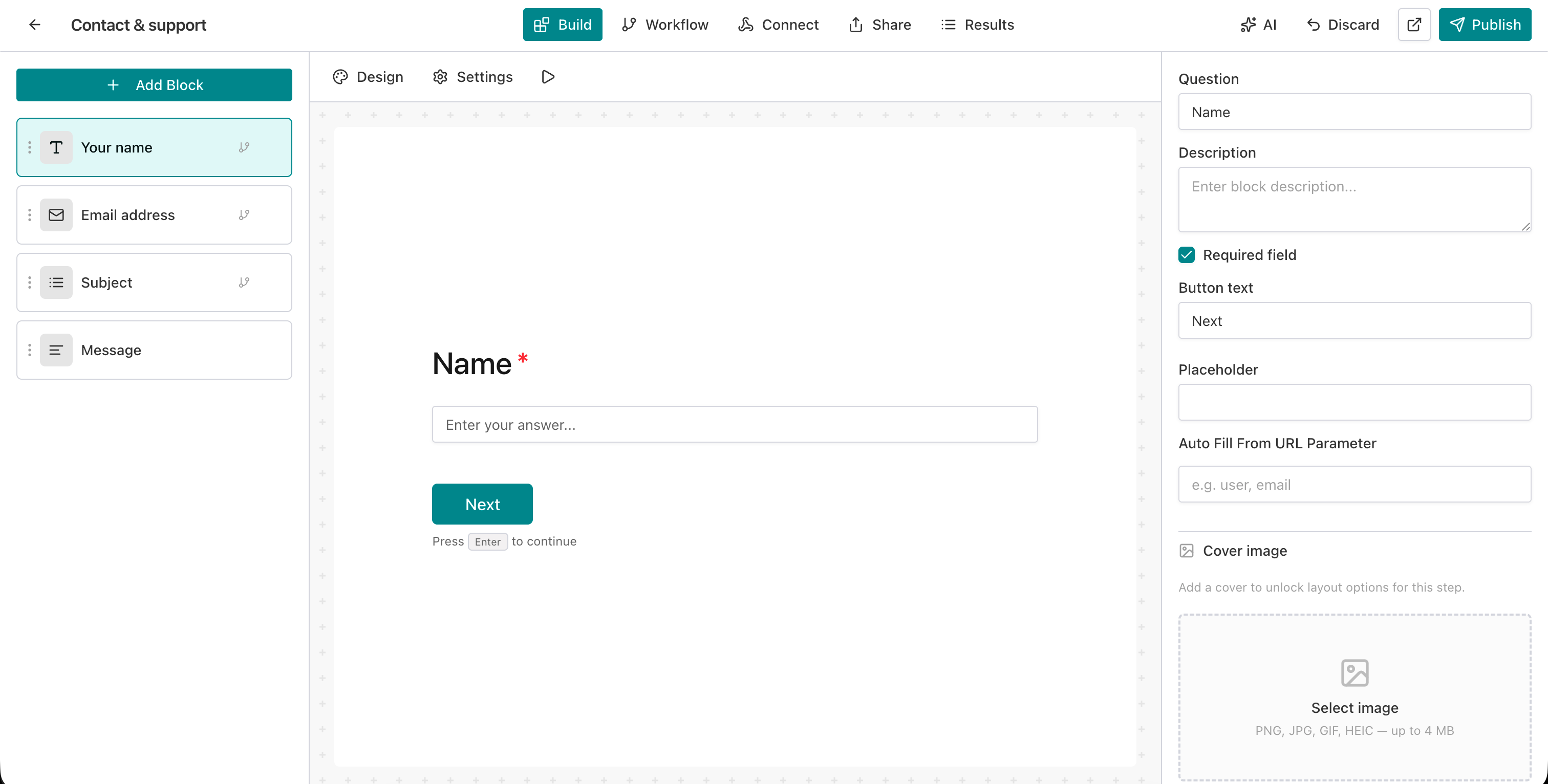
Step 1: Open the form editor
Go to your AntForms workspace and click the form you want to customize.
Step 2: Open Link Settings
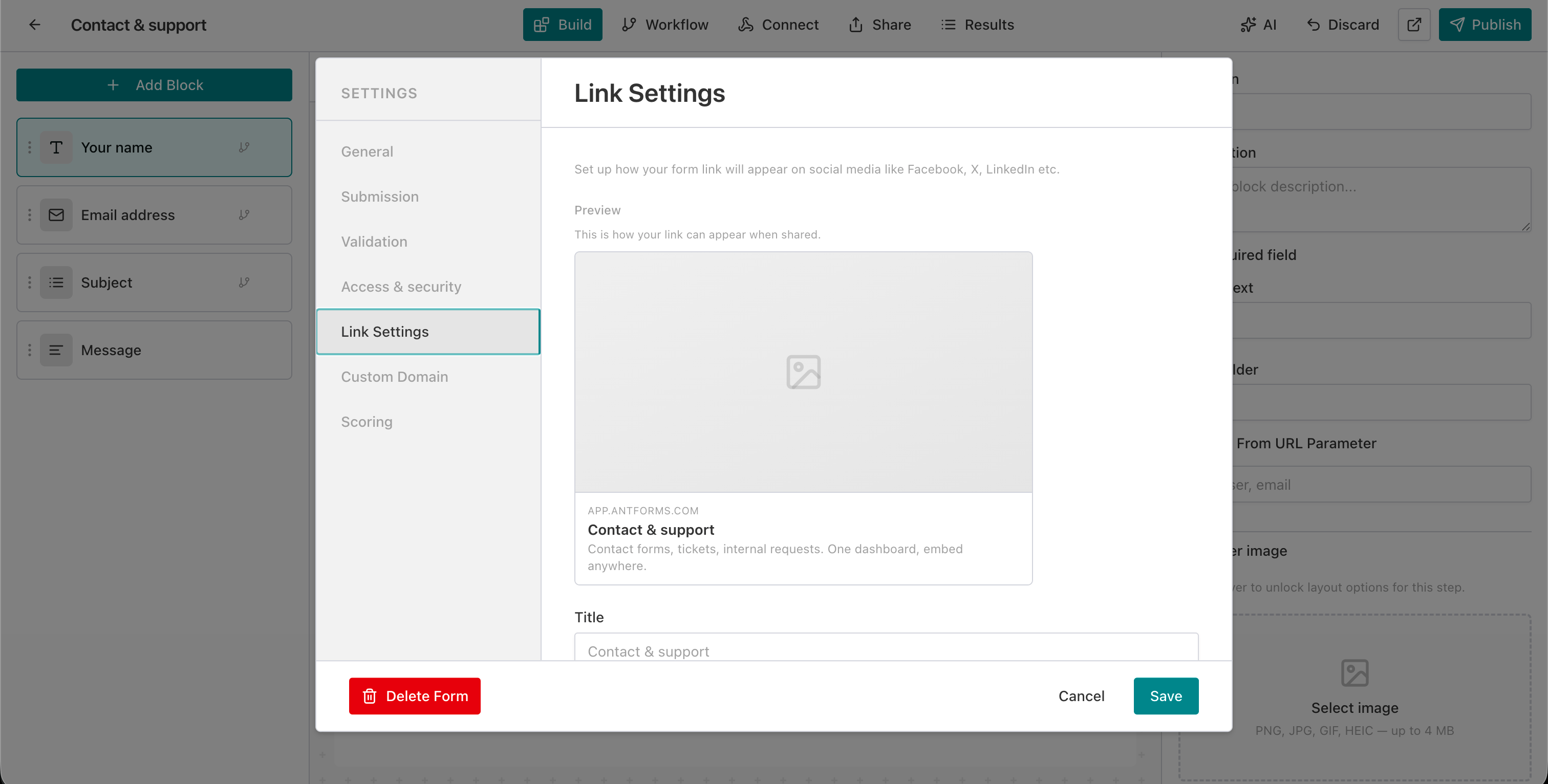
Click the Settings tab in the top navigation, then select Link Settings from the left-side menu. The panel shows a live preview card and input fields.
Step 3: Set the OG title
Edit the Title field. This becomes the og:title meta tag. Maximum 60 characters. If left empty, AntForms uses your form title.
Step 4: Set the OG description
Edit the Description field. This becomes the og:description meta tag. Maximum 155 characters. If left empty, AntForms uses your form description or “Fill out this form.”
Step 5: Upload a Social Preview Image (Pro plan)
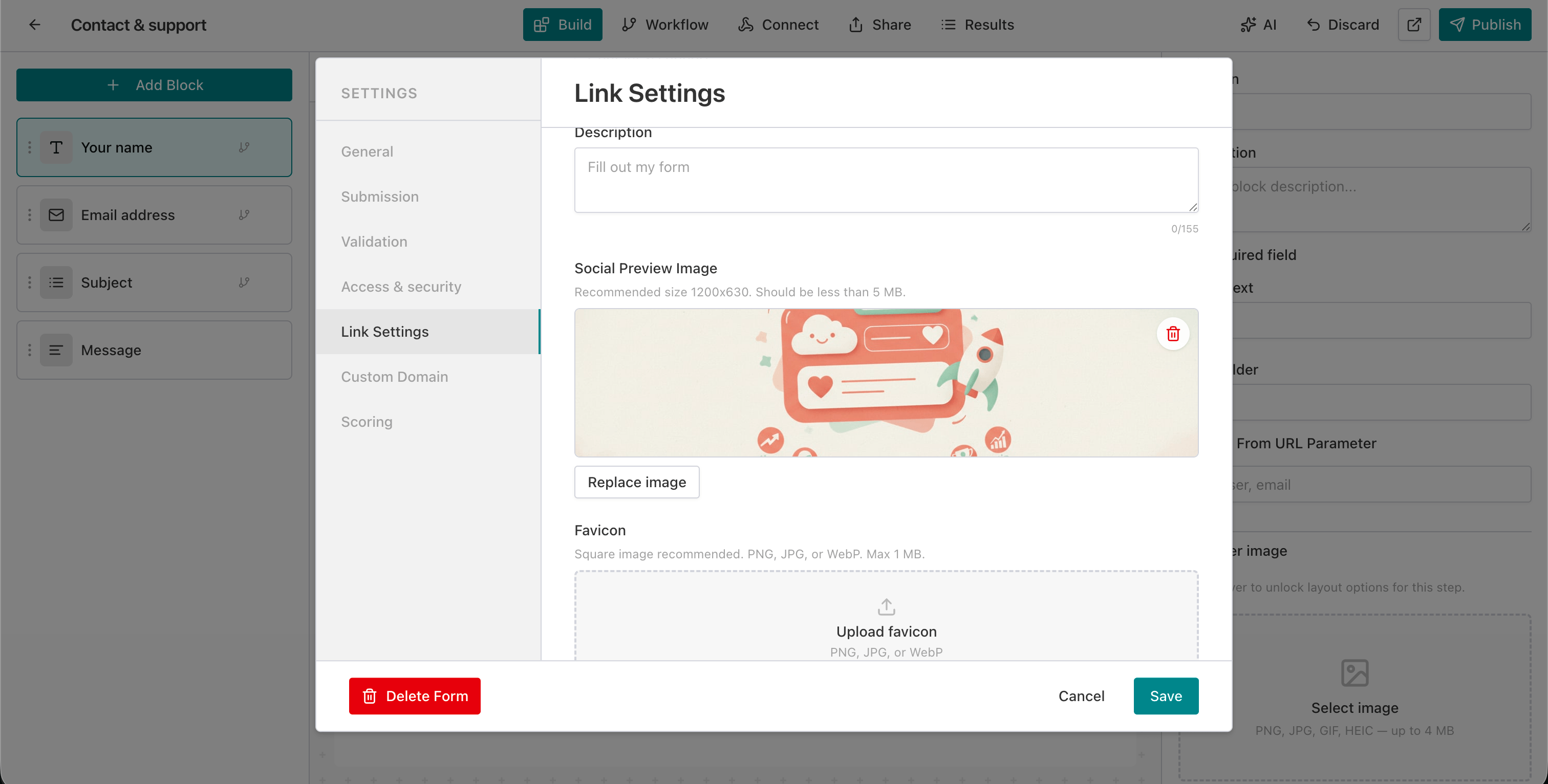
Click the image upload area and select a PNG, JPEG, or WebP file. Recommended size: 1200x630 pixels. Maximum file size: 5 MB. AntForms shows progress states: “Preparing upload,” “Uploading,” “Processing.”
Step 6: Upload a Favicon (Pro plan)
Scroll to the Favicon section and upload a square image (PNG, JPEG, or WebP, max 1 MB). AntForms resizes it to 128x128 pixels and serves it as the browser tab icon.
Step 7: Preview the result
The live preview card at the top of the panel updates to show your custom title, description, and image. This matches what Facebook, LinkedIn, and X display when someone shares your form link.
Step 8: Save and verify
Click Save. To verify on specific platforms, use Facebook’s Sharing Debugger or LinkedIn’s Post Inspector to force a cache refresh.
OG meta tags reference
AntForms generates 12 meta tags per form covering Open Graph, Twitter Card, favicon, robots, theme color, and canonical URL.
| Meta tag | Source field | Default fallback | Character limit |
|---|---|---|---|
og:title | OG Title | Form title | 60 chars |
og:description | OG Description | Form description or “Fill out this form” | 155 chars |
og:image | Social Preview Image | None (no image shown) | 1200x630 px, 5 MB |
og:type | Auto | website | N/A |
og:url | Auto | Form canonical URL | N/A |
twitter:card | Auto | summary_large_image (with image) or summary (without) | N/A |
twitter:title | OG Title | Form title | 60 chars |
twitter:description | OG Description | Form description | 155 chars |
twitter:image | Social Preview Image | None | Same as og:image |
| Favicon | Favicon upload | AntForms default favicon | 128x128 px, 1 MB |
robots | noIndex toggle | index (default) | N/A |
theme-color | Theme Color | None | Hex color |
Real-world use cases
Social link preview works for paid ad campaigns, customer feedback sharing, event registration, and white-label agency forms.
Lead generation ads. A marketing team runs LinkedIn ads linking to a lead capture form. The OG image matches the ad creative, so the link preview reinforces the ad message. A consistent visual from ad to form reduces bounce rates.
Customer feedback campaigns. A SaaS company shares a feedback survey in their product’s Slack community. The OG title reads “Help us improve [Product]” with a branded image. Community members click because the preview looks official.
Event registration sharing. A conference organizer shares the registration form link on X. The OG image shows the event logo and date. Attendees retweet the card, spreading a professional preview instead of a bare URL.
Internal HR forms. An HR team sends onboarding forms via Slack. The OG preview shows the company logo and “New Hire Onboarding” title, so new employees trust the link.
White-label client forms. An agency pairs social link preview with custom branding and custom domain. The OG image, favicon, form colors, and domain all match the client’s brand. No trace of AntForms appears in the shared link.
Tips for social link preview
Use 1200x630 images, keep titles under 60 characters, test on platform debugger tools, and match your ad creative for visual consistency.
Use 1200x630 pixel images. This is the Open Graph standard recommended by Facebook. Smaller images render as tiny thumbnails on some platforms. Larger images waste bandwidth.
Keep titles under 60 characters. Facebook truncates OG titles at 60 characters. LinkedIn truncates at 70. Target 50-60 for safe display across platforms.
Write action-oriented descriptions. “Share your feedback in 2 minutes” outperforms “A feedback form.” Include the time commitment and benefit.
Test on multiple platforms. Use Facebook’s Sharing Debugger, LinkedIn’s Post Inspector, and Twitter Card Validator to preview results on each platform.
Force cache refresh after updates. Social platforms cache OG data for 24-48 hours. Use the debugger tools above to force a re-scrape after changing your preview.
Pair with Slack integration. Combine social link preview with Slack integration for a complete workflow: branded form links shared in Slack channels, with responses routed back to Slack.
Match your ad creative. If you run paid ads linking to your form, use the same image in the OG preview. Visual consistency between ad and form preview reduces cognitive load and improves click-through.
Comparison: form builder social link preview
AntForms is the only form builder that optimizes OG images for WhatsApp and adds cache-busting timestamps to image URLs.
AntForms offers free OG title and description customization, while most competitors gate basic social preview settings behind paid tiers.
| Feature | AntForms | Typeform | Tally | Google Forms | Jotform |
|---|---|---|---|---|---|
| Custom OG title | Free | Paid (Basic+) | Free | No | Partial (paid) |
| Custom OG description | Free | Paid (Basic+) | Free | No | Partial (paid) |
| Custom OG image | Pro ($18.99/mo) | Paid (Basic+) | Free | No | Paid (Bronze+) |
| Custom favicon | Pro ($18.99/mo) | No | No | No | Enterprise |
| Twitter Card output | Yes (auto) | Yes | Yes | No | Partial |
| Live preview in editor | Yes | Yes | Yes | No | No |
| Image optimization | Yes (JPEG 85%, WhatsApp <300KB) | No | No | N/A | No |
| noIndex toggle | Yes (free) | Paid | Paid | No | Paid |
| Cache-busting URLs | Yes (auto) | No | No | N/A | No |
AntForms is the only builder that optimizes OG images for WhatsApp’s 300 KB limit and adds cache-busting timestamps to image URLs. Tally offers the most generous free tier for OG customization (including images). Google Forms has no social preview customization at any price. Typeform and Jotform gate all preview features behind paid plans. AntForms Pro at $18.99/month includes OG image upload, custom favicon, and the same free-tier title/description customization.
Limitations to know
AntForms social link preview has five constraints: static images only, JPEG output, no per-platform previews, platform caching, and no free-tier images.
AntForms social link preview covers OG images, titles, descriptions, and favicons. Five constraints apply.
No dynamic OG images. AntForms serves a static OG image per form. You cannot generate dynamic previews showing the respondent’s name or form completion percentage. We evaluated dynamic image generation using Satori and Puppeteer but found the rendering latency (2-4 seconds per image) incompatible with social platform crawlers that timeout after 5 seconds.
JPEG output for OG images, not WebP. AntForms converts all OG images to JPEG. Social platform crawlers (Facebook, LinkedIn) have inconsistent WebP support as of 2026. Facebook’s sharing documentation recommends JPEG or PNG for maximum compatibility.
No per-platform previews. AntForms generates one set of OG tags for all platforms. You cannot set a different image for Facebook vs LinkedIn. The Open Graph protocol uses a single og:image tag, and platform-specific overrides would require non-standard meta tag extensions that crawlers may ignore.
Social platform caching. After you update your OG image, Facebook caches the old version for up to 24 hours. LinkedIn caches for 7 days. AntForms adds cache-busting timestamps to image URLs, but platform crawlers may still serve stale data. During testing, we found that the Facebook Sharing Debugger is the only reliable way to force an immediate refresh.
Free tier shows no custom image. Without a Pro plan, your form link renders with no OG image thumbnail. The title and description appear, but most platforms display a text-only preview. This is consistent with how other form builders handle free-tier social sharing.
Key takeaways
- AntForms social link preview lets you set a custom OG title, description, image, and favicon per form.
- OG title and description are free on all plans. OG image and favicon upload require Pro ($18.99/month).
- AntForms generates both Open Graph and Twitter Card meta tags from your settings.
- OG images resize to 1200x630 JPEG at 85% quality with extra compression for WhatsApp’s 300 KB limit.
- The live preview card in Link Settings shows how your form link appears on social media before you share it.
- Cache-busting timestamps on image URLs force social crawlers to fetch updated images.
- Pair social link preview with custom branding and custom domain for a complete white-label form experience.
- Use platform debugger tools (Facebook Sharing Debugger, LinkedIn Post Inspector) to verify and refresh cached previews.
Related AntForms features
Social link previews work best alongside the rest of the visual and delivery stack:
- Cover images — reuse the cover as the OG image
- Form preview — verify the form itself before sharing the link
- Quiz scoring for scored outcome forms
- Route submissions to Slack, Google Sheets, Notion, Zapier, or Google Tag Manager
For more, see the AntForms 2026 review, what you can build with AntForms, and Tally vs. AntForms.