


Form Webhooks for Developers — Connect Your Backend or API
Problem: You have a backend, API, or internal tool that should react to form submissions. You don’t want to poll the form builder or rely on a third-party automation tool—you want a direct HTTP POST to your endpoint with a clear payload and a way to verify that the request came from the form builder.
Solution: Use webhooks to send every form submission to your HTTPS endpoint as a JSON POST. Optionally set a signing secret and verify the signature header (e.g. HMAC) so only the form builder can trigger your API. Use Deliveries to inspect payloads, response codes, and retry failed deliveries.
This guide is for developers who need to connect a form to their backend or API: payload shape, headers, verification, idempotency, and how to add and test webhooks in the form builder. For a form builder with unlimited responses and webhooks, see our best free form builder for surveys. For more use cases, see send form submissions to CRM, sync form data to Google Sheets or Airtable, and instant lead notifications with webhooks.
What you get
- HTTP POST to your URL on every form submission. Body: JSON.
- Structured payload:
event_id,event_type,created_at, anddatawithform,session, andresponses(map of block label →{ blockId, blockType, responses }). - Optional signing secret: We sign the raw body with HMAC-SHA256 and send
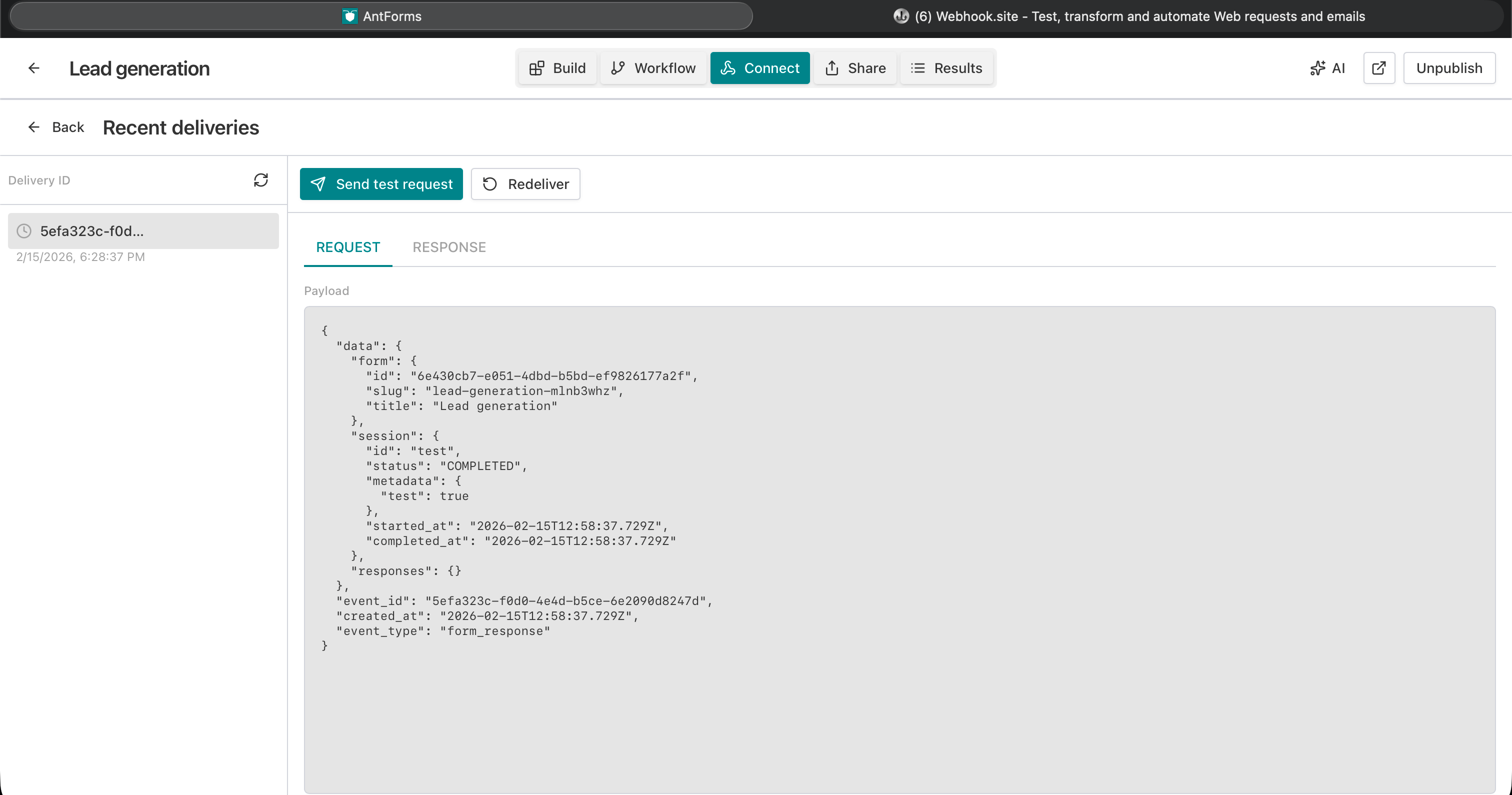
X-Jupiter-Signature: sha256=<base64>so you can verify the webhook and avoid spoofing. - Delivery log: Per-webhook list of deliveries with status (PENDING, SUCCESS, or FAILED), response code, full request payload, and response body truncated to 2000 characters (for debugging). Retry only PENDING or FAILED deliveries; Send test request without submitting the form.
Webhook payload (form_response)
Every form submission triggers one POST per enabled webhook. Example body:
{
  "event_id": "550e8400-e29b-41d4-a716-446655440000",
  "event_type": "form_response",
  "created_at": "2026-02-15T14:32:00.000Z",
  "data": {
    "form": { "id": "form-uuid", "title": "Contact", "slug": "contact" },
    "session": {
      "id": "session-uuid",
      "status": "COMPLETED",
      "started_at": "2026-02-15T14:31:00.000Z",
      "completed_at": "2026-02-15T14:32:00.000Z",
      "metadata": {}
    },
    "responses": {
      "Name": { "blockId": "b1", "blockType": "SHORT_TEXT", "responses": { "text": "Jane Doe" } },
      "Email": { "blockId": "b2", "blockType": "EMAIL", "responses": { "email": "jane@company.com" } },
      "Message": { "blockId": "b3", "blockType": "LONG_TEXT", "responses": { "text": "Need API access" } }
    }
  }
}- event_id — Unique UUID per event. Use for idempotency (store in DB and skip if already processed).
- event_type —
"form_response"for form submissions. - created_at — ISO 8601 timestamp (UTC) when the event was created.
- data.form — Form
id,title,slug. - data.session — Session
id,status,started_at,completed_at,metadata. - data.responses — Map of block label (e.g. “Name”, “Email”) →
{ blockId, blockType, responses }. Block types includeSHORT_TEXT,LONG_TEXT,EMAIL,MULTIPLE_CHOICE,NUMBER,YES_NO, etc. Eachresponsesobject has field keys (e.g.text,email,choice) and the submitted value.
Headers we send:
Content-Type: application/jsonUser-Agent: Jupiter-Forms-Webhook/1.0X-Jupiter-Event-Id— Same asevent_idin the body.X-Jupiter-Event-Type— Same asevent_type(e.g.form_response).X-Jupiter-Signature— Present only when a webhook secret is set:sha256=<base64(HMAC-SHA256(secret, raw_body))>. Verify using the raw request body (before parsing JSON).
Your endpoint should:
- Verify the signature (if you use a secret) using the same algorithm and the raw body.
- Return 2xx quickly after accepting the request so we mark the delivery as successful and don’t retry unnecessarily.
- Return 4xx/5xx or timeout if you want us to retry. We retry on 5xx, 429, and timeouts (exponential backoff, up to 5 attempts). 4xx (except 429) are not retried. On 429 we respect the
Retry-Afterresponse header when present (capped at 24 hours). Check Deliveries and use Retry manually for failed or pending deliveries if needed.
How to add and test a webhook
Add webhook
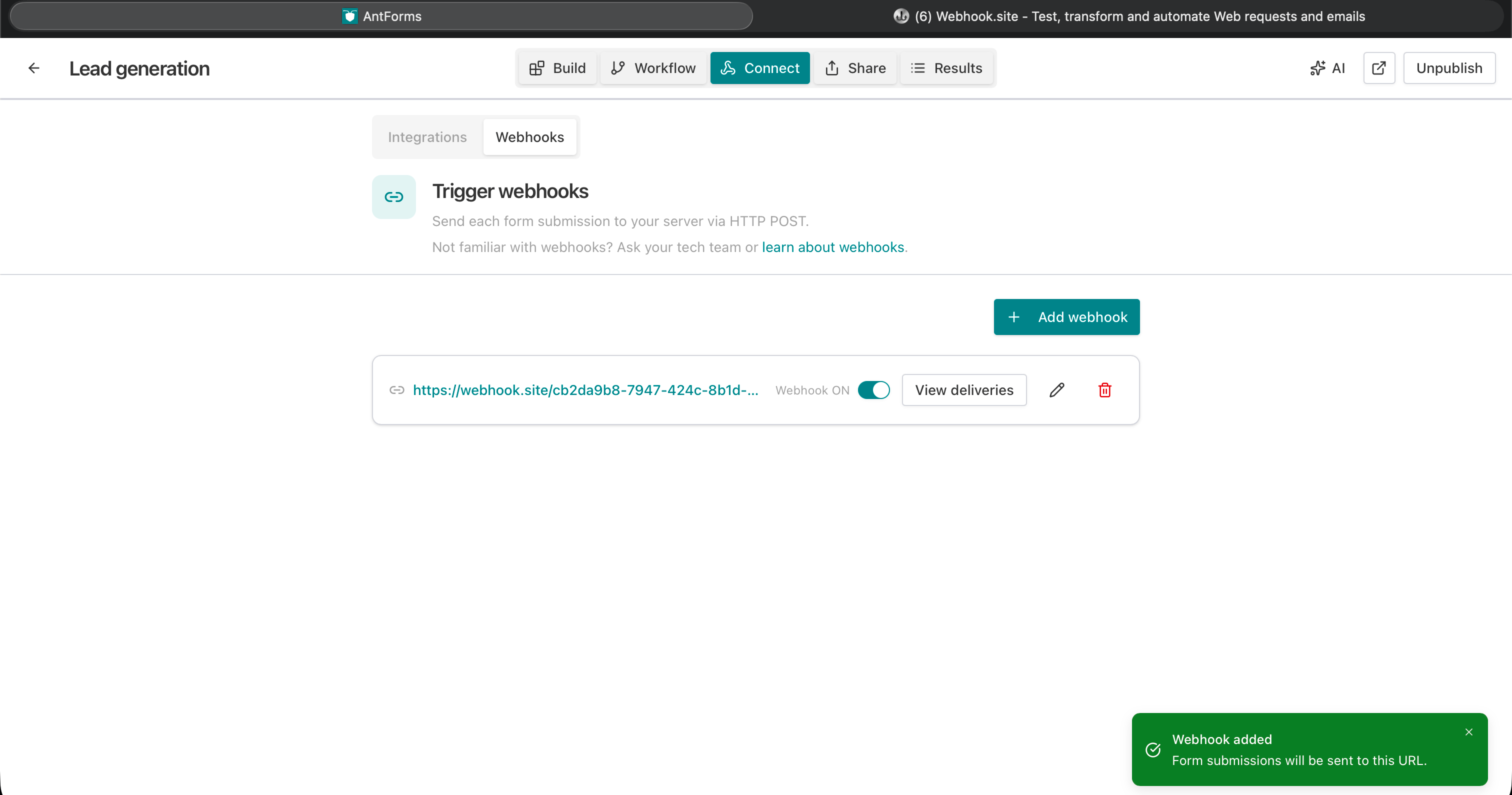
- Open the form → Integrations (or Connect) → Webhooks.
- Click Add webhook.
- Endpoint: Your HTTPS URL (e.g.
https://api.yourcompany.com/webhooks/form-submissions). Must be HTTPS (max 2048 characters). - Description (optional): e.g. “Production API” (max 500 characters).
- Secret (optional): Shared secret used to sign the raw body (HMAC-SHA256). Leave blank to skip verification; set a strong value (max 512 characters) and verify
X-Jupiter-Signatureon your side for production. - Save. The webhook is enabled by default.
Test and debug
- Send test request: Sends a sample POST to your URL so you can confirm your endpoint receives the payload and returns 2xx. No form submit required.
- Deliveries: List of recent deliveries for that webhook: status, response code, and (when you open one) REQUEST (full payload) and RESPONSE (status + body). Use this to debug auth, validation, or timeouts.
- Retry: Only PENDING or FAILED deliveries can be retried. Use Retry to re-queue the same payload after fixing your endpoint.
Use case: form submissions into your API or backend
Audience: Developers and teams that own the backend and want form data to land in their system (database, queue, internal API) without using a no-code automation tool.
Goal: Every form submission triggers an HTTP POST to your endpoint. You parse the JSON, validate/sanitize, optionally verify the signature, and then do whatever you need (write to DB, enqueue job, call another service). No polling, no manual export.
How it works:
- You expose an HTTPS POST endpoint (e.g.
/webhooks/form-submissions) that accepts JSON. - You add a webhook in the form builder with that URL and (recommended) a secret.
- On each form submit we POST the payload; your server verifies the signature, processes the body, and returns 2xx.
- You use Deliveries to confirm success and Retry for any failures after fixing your endpoint.
Idempotency: Use event_id as an idempotency key. Store it in your DB or cache; if you see the same key again (e.g. after a retry), skip duplicate processing.
Verification (signing secret)
If you set a secret when creating/editing the webhook, we send the header X-Jupiter-Signature with value sha256=<base64(HMAC-SHA256(secret, raw_body))>. The raw body is the exact UTF-8 bytes we send (do not re-serialize parsed JSON).
Server-side (pseudocode):
1. Read raw body (e.g. req.rawBody or req.body before JSON parse).
2. Read X-Jupiter-Signature header.
3. Compute expected = "sha256=" + base64(HMAC-SHA256(secret, raw_body)).
4. Compare with header using constant-time compare. Reject if different.
5. Then parse JSON and process.
If you don’t set a secret, we don’t send a signature. For production, use a secret and verify.
Example: Node.js (Express) endpoint with verification
const crypto = require('crypto');

function verifySignature(rawBody, signatureHeader, secret) {
  if (!secret || !signatureHeader) return false;
  const expected = 'sha256=' + crypto.createHmac('sha256', secret).update(rawBody).digest('base64');
  return crypto.timingSafeEqual(Buffer.from(signatureHeader), Buffer.from(expected));
}

app.post('/webhooks/form', express.raw({ type: 'application/json' }), (req, res) => {
  const rawBody = req.body.toString('utf8');
  const signature = req.headers['x-jupiter-signature'];
  if (!verifySignature(rawBody, signature, process.env.WEBHOOK_SECRET)) {
    return res.status(401).send('Invalid signature');
  }
  const payload = JSON.parse(rawBody);
  if (payload.event_type !== 'form_response') {
    return res.status(400).send('Unknown event type');
  }
  // Idempotency
  if (await alreadyProcessed(payload.event_id)) return res.status(200).send('OK');
  // Process: save to DB, queue job, etc. Use payload.data.form, payload.data.session, payload.data.responses.
  await processSubmission(payload);
  res.status(200).send('OK');
});
Use express.raw() so the body is available as a Buffer for signature verification before parsing JSON. Set WEBHOOK_SECRET to the same value you entered in the form builder.
Example: Python (Flask) with HMAC verification
import base64
import hmac
import hashlib

def verify_signature(body: bytes, signature_header: str, secret: str) -> bool:
    if not secret or not signature_header:
        return False
    expected = 'sha256=' + base64.b64encode(hmac.new(secret.encode(), body, hashlib.sha256).digest()).decode()
    return hmac.compare_digest(signature_header, expected)

@app.route('/webhooks/form', methods=['POST'])
def form_webhook():
    body = request.get_data()
    sig = request.headers.get('X-Jupiter-Signature', '')
    if not verify_signature(body, sig, os.environ['WEBHOOK_SECRET']):
        return 'Invalid signature', 401
    data = request.get_json(force=True)
    if data.get('event_type') != 'form_response':
        return 'Unknown event', 400
    # Idempotency and process (use data['data']['form'], data['data']['session'], data['data']['responses'])
    if already_processed(data['event_id']):
        return 'OK', 200
    process_submission(data)
    return 'OK', 200
Use request.get_data() for the raw body and verify before get_json().
FAQs — form webhooks for developers
What HTTP method and content type?
POST. Body is JSON; we send Content-Type: application/json. Your endpoint should accept POST and parse JSON (after verifying the signature using the raw body).
How do I get the raw body for signature verification?
Use the unparsed body (e.g. Express express.raw() with the same route, or read the request stream). Don’t use the parsed JSON object for the HMAC input—use the exact bytes we send. Use timing-safe comparison (e.g. crypto.timingSafeEqual) when comparing the signature to prevent timing attacks.
What if my endpoint returns 200 but then fails later?
We mark the delivery as successful when we get 2xx. If your processing is async (e.g. you queue a job and return 200), make sure your queue/worker is reliable and you have your own retries. You can also use Deliveries to see which event_ids were sent and reconcile with your DB.
Can I add custom headers to the webhook request?
The API supports custom headers per webhook (e.g. Authorization, X-API-Key). Reserved headers (Content-Type, User-Agent, X-Jupiter-Event-Id, X-Jupiter-Event-Type, X-Jupiter-Signature) cannot be overwritten. Check the form builder’s webhook settings; if the UI exposes custom headers, you can send them with every delivery.
Is there a rate limit or retry policy?
We retry on 5xx, 429, and timeouts with exponential backoff, up to 5 attempts. The request times out after 15 seconds. The response body we store in Deliveries is truncated to 2000 characters. Use Deliveries and Retry to handle transient failures.
Multiple webhooks per form?
Yes. You can add up to 3 webhooks per form (e.g. one for CRM, one for your API, one for Slack). Each submission is sent to every enabled webhook.
Conclusion
Key takeaway: Expose an HTTPS endpoint that accepts JSON, optionally verifies the signature, and processes form_response payloads. Add it as a webhook in your form, use Send test request and Deliveries to confirm, then rely on it for every new submission.
Try AntForms to add your webhook endpoint—unlimited responses, full payload control. For more, read send form submissions to CRM and sync form data to Google Sheets or Airtable.